
Vet Practice
Handle refill requests
In Vivetra: Vet Practice › Refill Requests
On this page
Owners can ask for a prescription refill from the client portal. Those requests wait in Refill Requests until a vet approves or declines them. Approving one records a real dispense against the prescription; the owner can only ask.
Anyone can see the list. Approving, declining or cancelling needs the prescribing permission, which veterinarians have. Everyone else sees a note saying they can view requests but not act on them, and no buttons.
Find a request
- Select Refill Requests in the Vet Practice group of the menu.
- The list opens on Pending. To see older requests, select Approved, Declined, Cancelled or All.
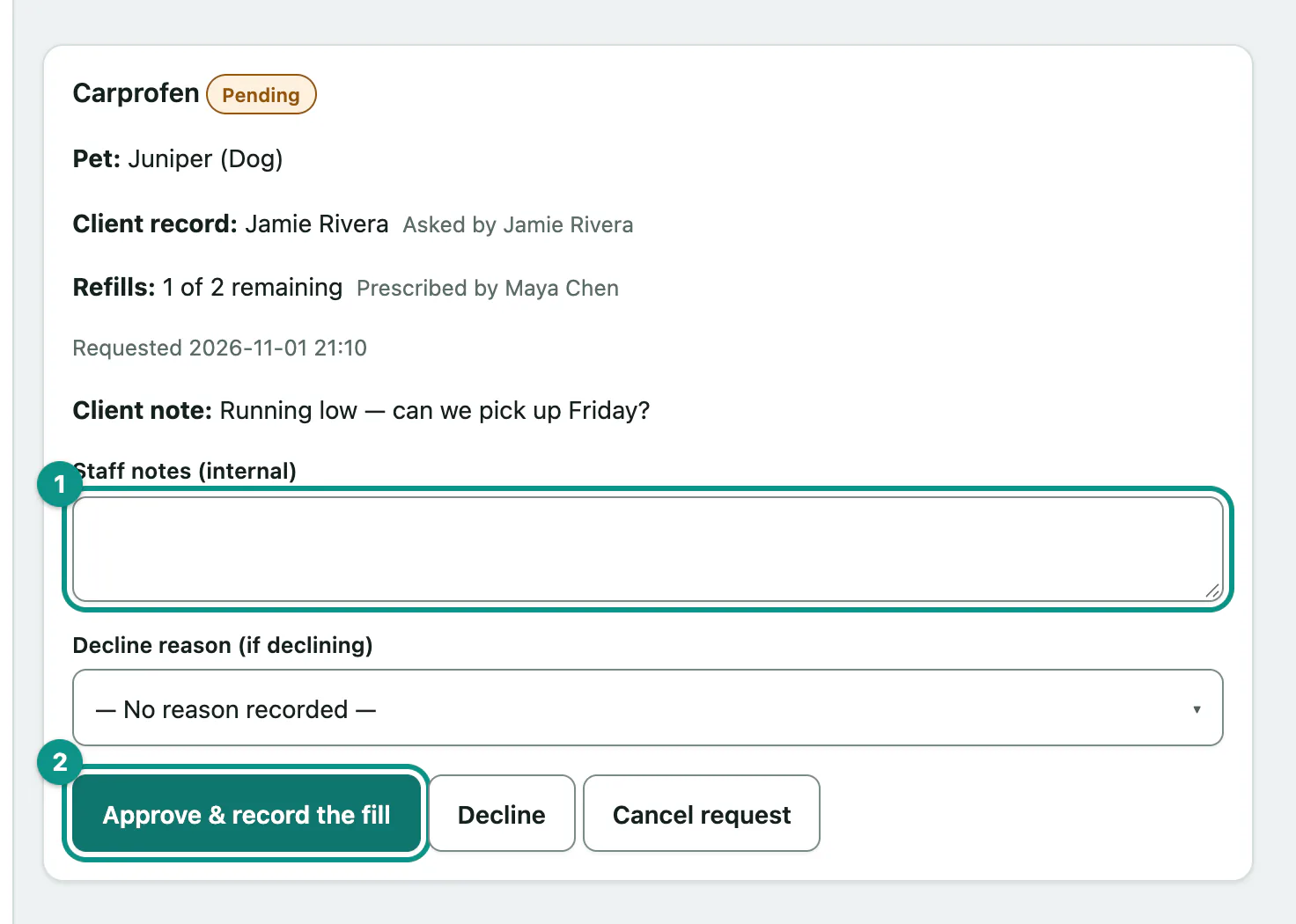
Each request shows the medication, the Pet:, the Client record: and who asked, and Refills: remaining out of the number authorized, with the prescribing vet. Any Client note: the owner left is shown too.
Approve a refill
- Optionally add Staff notes (internal). The owner never sees these.
- Select Approve & record the fill.
The fill is recorded under the prescribing vet's authority, with you as the person who dispensed it, and the owner sees the decision in their portal.
When you can't approve
The approve button doesn't appear, and a note says why, when:
- the drug is controlled (Controlled). Handle those on the prescription record instead.
- the medication has been discontinued (Discontinued).
- the pet is marked deceased (Pet deceased).
- the prescribing vet is no longer active. A current vet needs to write a new prescription.
- no refills remain.
Decline these with a reason so the owner knows what to do next.
Decline a request
- Choose a Decline reason (if declining).
- Optionally add Staff notes (internal).
- Select Decline.
| Reason | Use it when |
|---|---|
| Needs an exam first | The pet has to be seen before you'll prescribe again. |
| Needs a recheck first | A recheck is due first. |
| No refills left — new prescription needed | All authorized refills are used. |
| Medication discontinued | The pet should no longer have it. |
| Not our patient | The request doesn't belong to your practice. |
| Other | Anything else. |
The owner sees a short explanation based on the reason, never your notes.
Cancel a request
- Select Cancel request to close a request without approving or declining it.
Messages
| Message | Meaning |
|---|---|
| Refill approved — the dispense has been recorded. | Done. |
| That request was already handled by someone else — refresh to see its current state. | A colleague got there first. |
| That prescription is a controlled substance and cannot be refilled from a portal request. Handle it on the prescription record instead. | Use the prescription record. |
| No refills remain on that prescription | Decline it with No refills left — new prescription needed. |