
Client portal · Boarding
Share your account with your household
In Vivetra: Who can access this account
On this page
You can let other people, such as a partner or a family member, see and use your boarding or grooming account with their own sign-in. Anyone you add sees everything you see: stays, grooming appointments, bills and paperwork.
- Select Who can access this account in the portal menu. You can also select Who can see this account under Your account on Your pets.
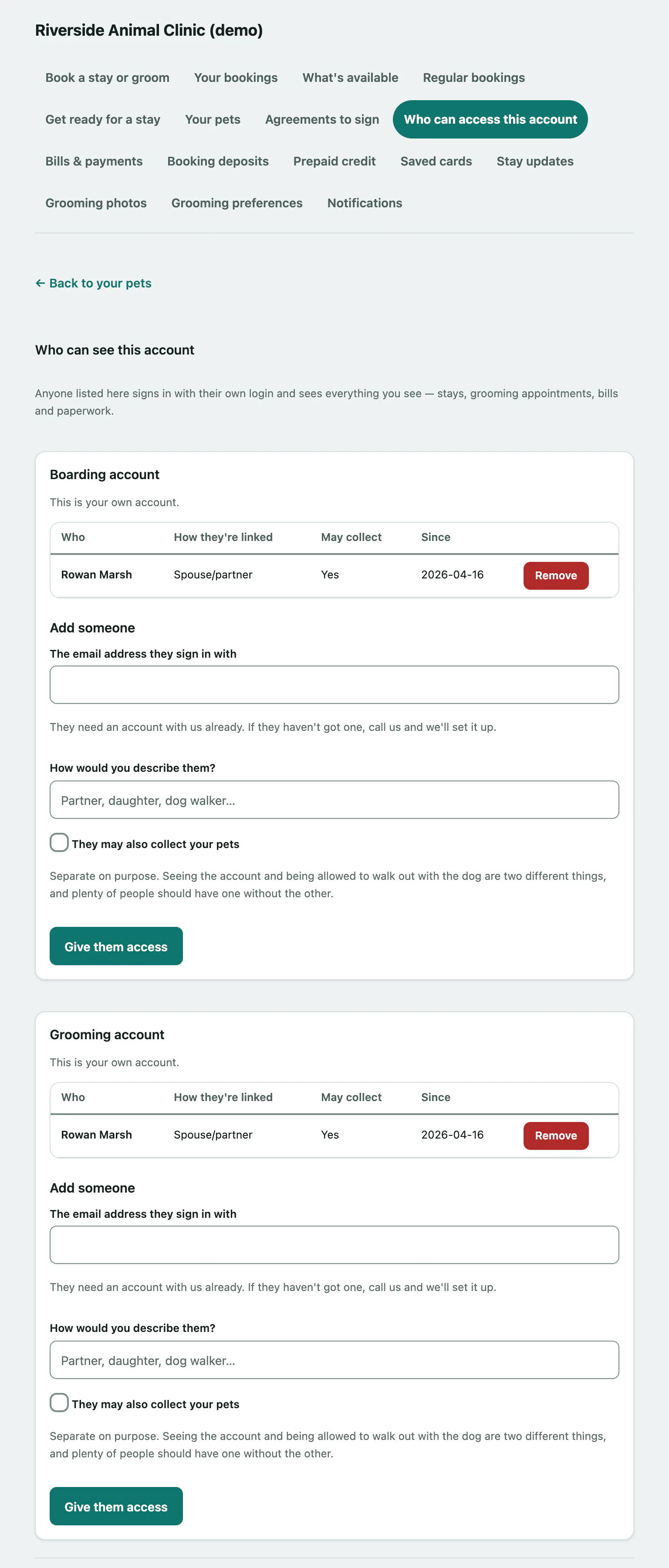
There's a card for your Boarding account and one for your Grooming account if you have both. Each lists who's been added, How they're linked, whether they May collect your pets, and since when.
Add someone
The person needs their own sign-in with the facility already. If they don't have one, call the facility to set it up first.
- Under Add someone, enter The email address they sign in with.
- Optionally, describe them in How would you describe them?, for example partner or dog walker.
- Tick They may also collect your pets only if they're allowed to pick your pets up.
- Select Give them access.
The page says Done. If the address has a sign-in with the facility, they appear in the list and can see your account from their next sign-in. If they're not listed, call the facility.
Remove someone
- Select Remove next to the person.
Their access ends straight away. It doesn't close their own account with the facility or change anything about your pets.
Who can make changes
Only the person who holds the account can add or remove people. If you were added by someone else, the card says You're on this account as a household member. and you can't change the list. Some facilities add and remove people at the desk instead; then the page says We add and remove people at the desk rather than online.