
Livestock
Record disease tests and movement certificates
On this page
For an individually tracked animal you can record brucellosis, TB and trichomoniasis tests, keep the herd's routine TB schedule, and issue a movement certificate. Vivetra keeps these as your practice's records and printable documents. It never sends anything to APHIS, a lab or a state authority.
Only veterinarians can record tests and issue certificates. Veterinarians, front-desk coordinators and practice managers can set the herd's TB schedule.
Open disease testing
Open the animal's livestock page (see Track an individual animal › Open an animal), then:
- Select Disease testing.
Keep the herd TB schedule
Herd TB testing schedule belongs to the animal's operation, so it's the same for every animal in that herd. It shows the routine interval, when the next test is due and a DUE SOON or OVERDUE badge when it applies.
- Enter the Routine interval (months) set for your area.
- Select Save herd TB schedule.
Before saving, enter the Next TB test due on date, or tick Compute the due date from this animal's latest clean (negative) TB test + the interval (overrides the date field above) to have Vivetra work it out.
The badge is a reminder only. It says nothing about the herd's accreditation or zone status.
Record a test
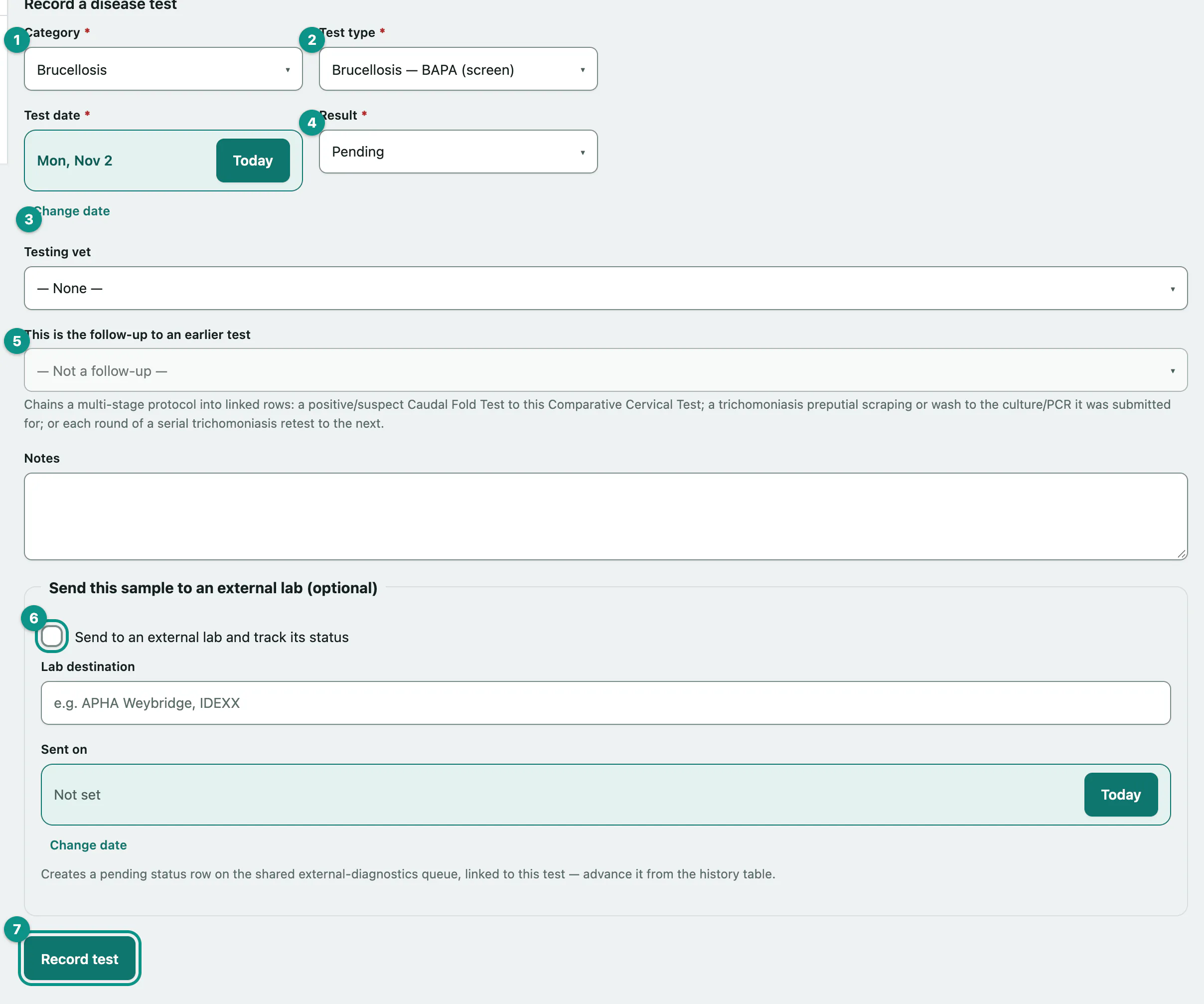
- Under Record a disease test, choose the Category: Brucellosis, TB or Trichomoniasis.
- Choose the Test type, for example TB — Caudal Fold Test (CFT).
- Check the Test date.
- Choose the Result: Pending, Negative, Positive or Suspect, and the Testing vet.
- If this test follows up an earlier one, choose it in This is the follow-up to an earlier test. For example, link a comparative cervical test to the caudal fold test that prompted it, or a trich culture to the scraping it came from.
- To send the sample out, tick Send to an external lab and track its status and fill in the lab and the date sent.
- Select Record test.
The test appears under Disease-test history.
Update a lab result
When a test was sent to a lab, its row in Disease-test history shows the lab status. While it's pending or received, choose the new status (Pending, Received, Closed or Cancelled) and enter the result date and a short result summary, then:
- Select Update.
Issue a movement certificate
A movement certificate is the cattle equivalent of a CVI for this one animal. For a whole lot moving together, see Manage animal lots › Issue a group movement certificate.
- Under Issue a movement certificate, check the Issue date and choose the Issuing vet.
- Enter the destination region and choose the Destination type.
- Enter the Expires on (staff-entered) date. Validity is set by each state, so Vivetra doesn't work it out.
- Select Issue certificate.
Before you issue it, choose the Certificate scope (Domestic interstate, Export or Other) if it applies, and add the certificate number and a note of the tests backing it.
Print a certificate
- Select Print movement certificate at the top of the page.
The printout is the Movement certificates list.