
Client portal · Boarding
Get ready for a stay
In Vivetra: Get ready for a stay
On this page
Get ready for a stay gathers everything the facility needs before drop-off in one place: vaccinations, paperwork, what you're bringing, and your pet's feeding and routine. Doing it in advance makes drop-off quick.
Choose the stay
- Select Get ready for a stay in the portal menu. Your stays in the next 60 days are listed.
- Select Get this one ready on the stay you're preparing for.
If none are listed, you have no stays in the next 60 days, so there's nothing to get ready yet.
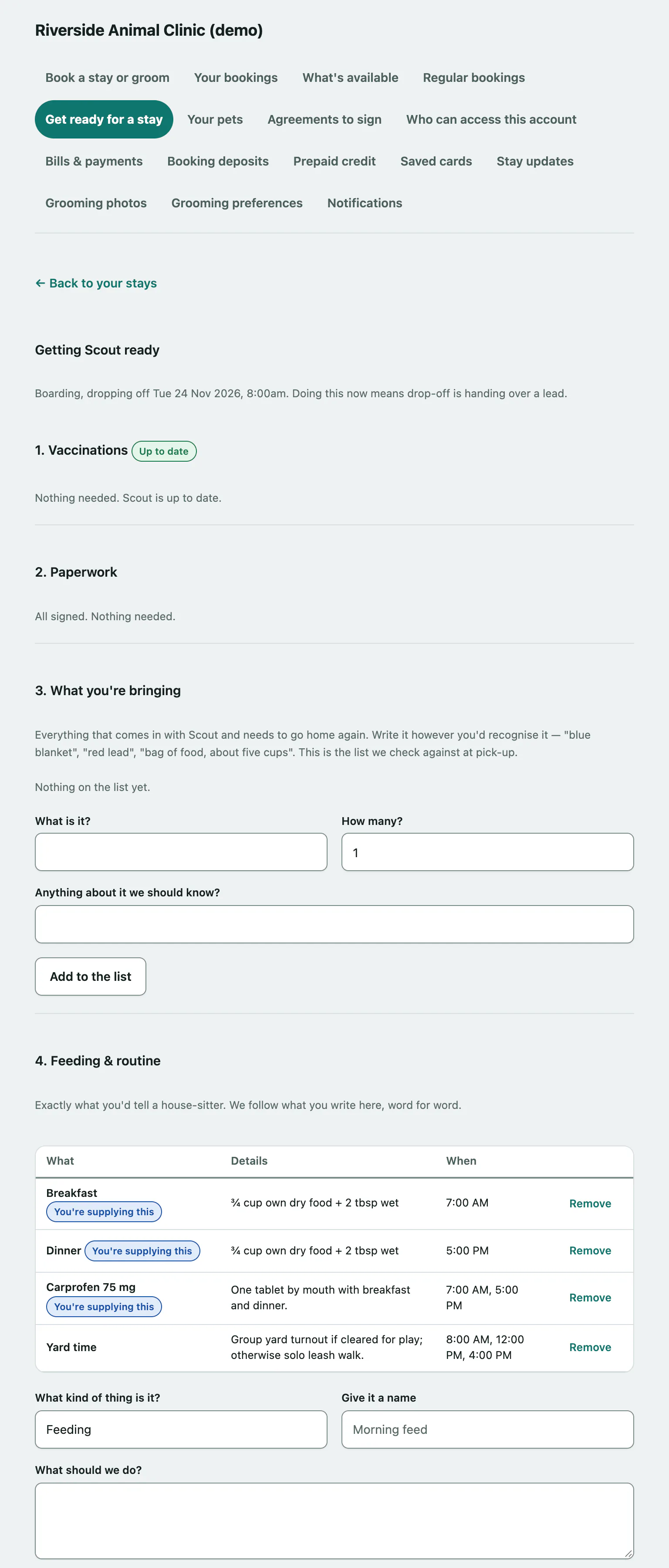
The page works through four steps, plus a fifth if your facility has questions for you.
1. Vaccinations
This shows whether your pet's vaccinations are up to date for the stay. If something is missing or runs out before the stay ends, it's listed. Select Send us the record to send a photo of it (see Send a vaccination record).
If you've already sent a record that's still being checked, there's nothing more to do.
2. Paperwork
Any agreements you still need to sign are listed. Select Sign these to sign them. When everything is signed, you'll see All signed. Nothing needed.
3. What you're bringing
List everything that comes in with your pet and needs to go home again. The facility checks against this list at pick-up.
- Describe the item in What is it?, for example "blue blanket" or "red lead". Change How many? if there's more than one, and add anything useful in Anything about it we should know?.
- Select Add to the list.
Select Remove next to an item to take it off the list.
4. Feeding & routine
Write exactly what you'd tell a house-sitter. The team follows what you write here.
- Choose What kind of thing is it?: Feeding, Walks, Play or Something else. Give it a name in Give it a name, such as "Morning feed".
- Describe it in What should we do?, and say when in When?, such as "8am & 6pm".
- If you're sending the food or medication with your pet, tick You're sending the food or medication with them. That puts it on the list of things that go home again.
- Select Add this.
5. A couple of questions
If your facility has forms to fill in before a stay, they're listed here. Select one to answer it.