
Records & admin
Log a shift handoff
On this page
When you hand a case to the next clinician, log it. The handoff log is a permanent record of who held the case and what they passed on, so nothing gets lost between shifts.
Open it from the patient's flowsheet with Shift handoffs → (see Chart treatments and vitals on the flowsheet). Anyone can read the handoffs. Logging one needs nursing-chart permission, which veterinarians have.
Log a handoff
- Under Log a handoff, choose the Incoming clinician, the person taking over. It can't be you.
- Write the Handoff narrative (required): how the patient is and what's been done.
- List anything still to do in Outstanding tasks (optional).
- Select Log handoff.
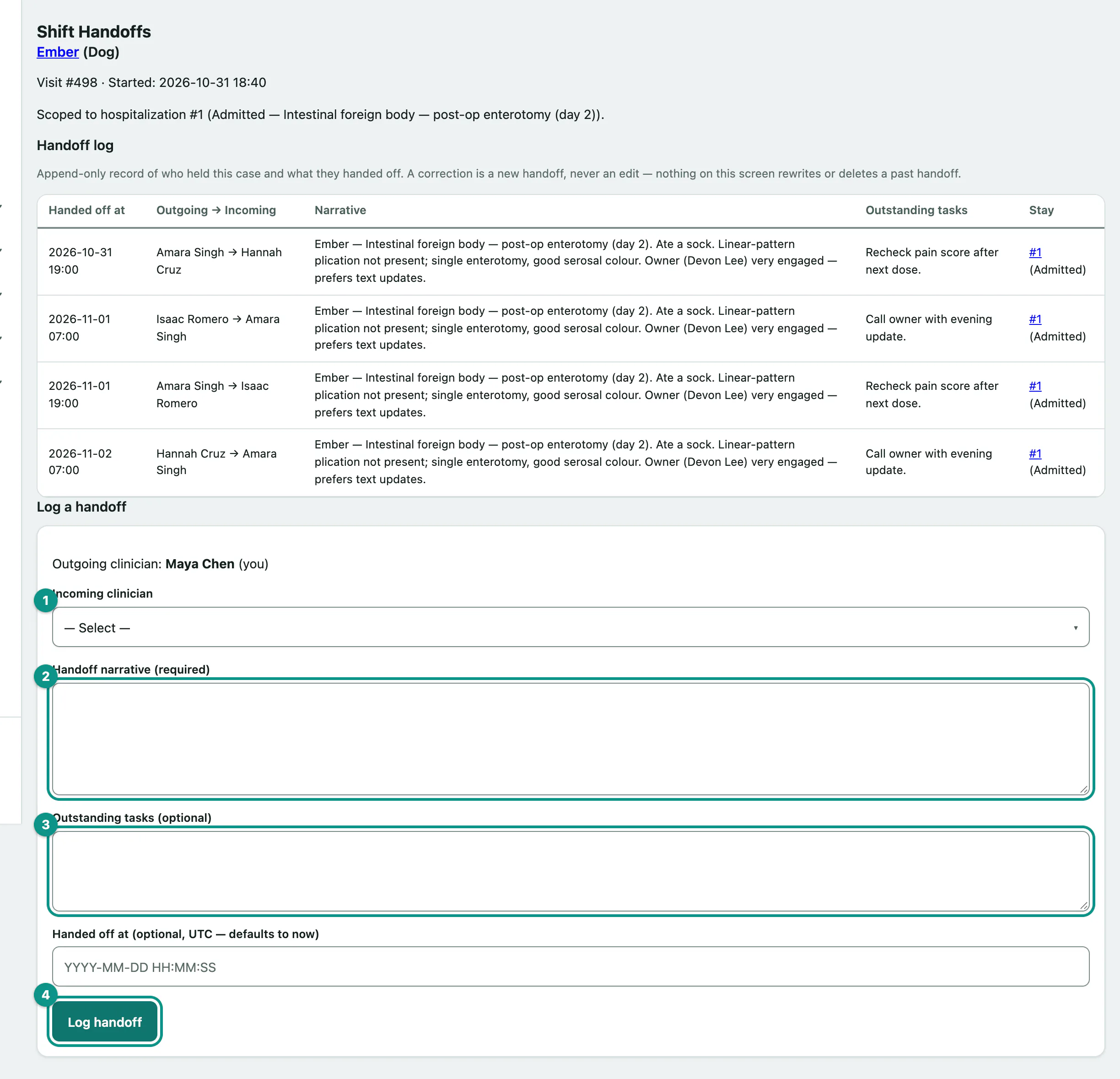
Handed off at defaults to now. You only need it to record a handoff that happened earlier; that box is in UTC, not clinic time.
Read past handoffs
Handoff log lists every handoff for the visit, oldest first, with the time, Outgoing → Incoming, the narrative, outstanding tasks and the hospital stay it belongs to. Entries can't be edited or deleted. If something changes, log a new handoff.