
Equine
Track a mare's heat cycles
On this page
The heat cycles screen is where you record what you find each time you check a mare: teasing scores, scans, follicles, ovulations and the cycles themselves. From those records Vivetra predicts her next heat window.
Recording needs the clinical-authorship permission, which vets have by default. Everyone else can read the screen. It only works for mares; a horse recorded as male can't have heat cycles.
Open a mare's heat cycles
- On the mare's record, select Heat cycles (see Work with a horse's record). You can also select Cycles next to her on the breeding overview (see See the breeding season at a glance).
The predicted heat window
Predicted heat window at the top says what state she's in, when her next heat is expected, and what the prediction is based on. It's worked out from her own recorded ovulation-to-ovulation intervals, shown underneath in Interval history.
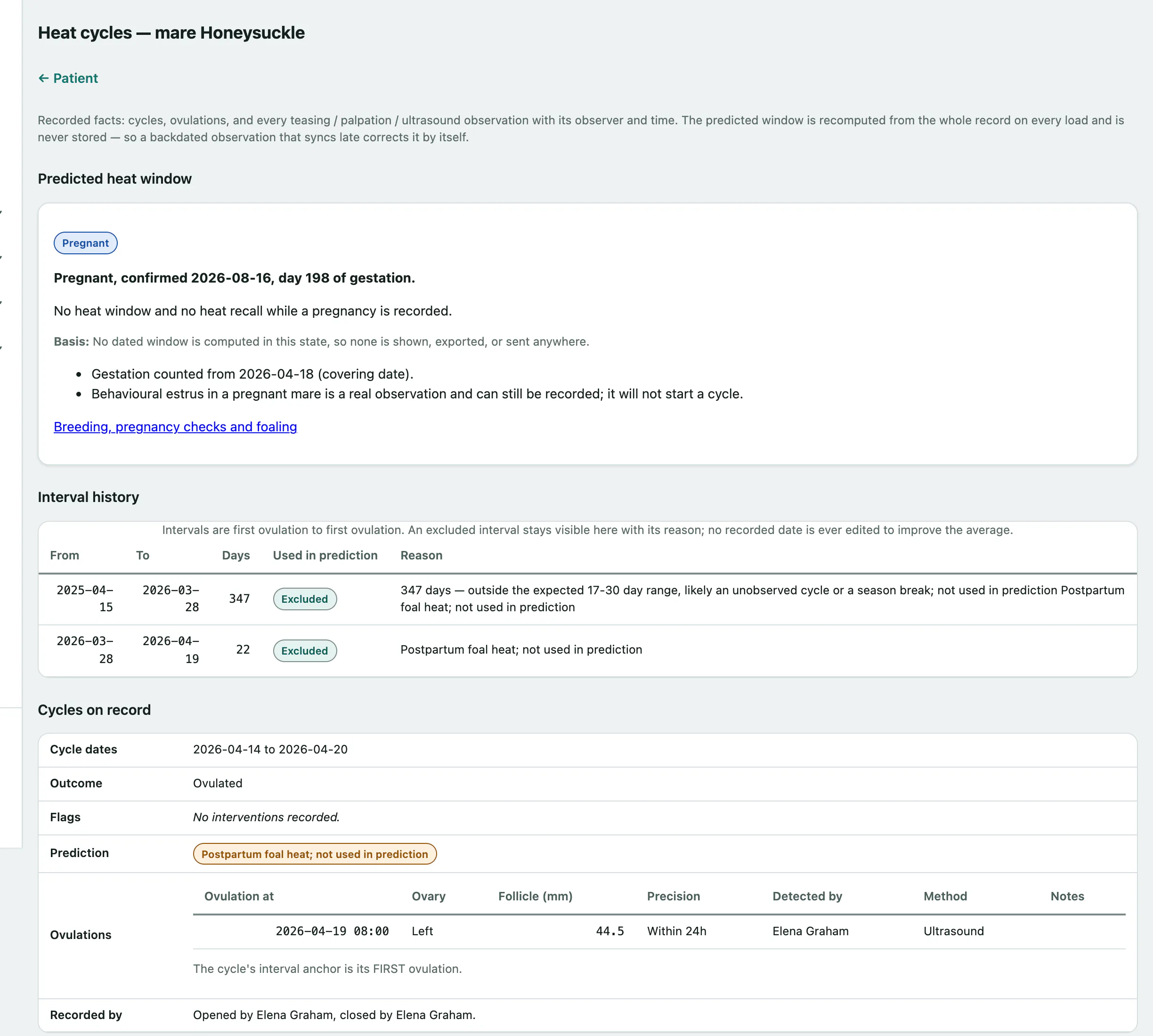
Some intervals aren't used in her average, such as those around her foal heat or a cycle shortened with prostaglandin. They stay visible in the history with the reason.
If her reproductive status is anestrus, transitional or not cycling, or she's on an estrus suppression drug today, no dated window is shown.
Record an observation
Record every check, even several on the same day. Observations are never merged.
- Under Record an observation, set Observed at to when you checked her, in clinic time.
- Choose the Method: Teasing, Palpation, Ultrasound, Lab or Other.
- Enter what you found, such as the Teasing score (0–4), Uterine edema score (0–5), which ovaries you examined, and up to several follicles with their ovary and diameter. Leave a score blank if you didn't assess it; a 0 is a real finding.
- Select Save observation.
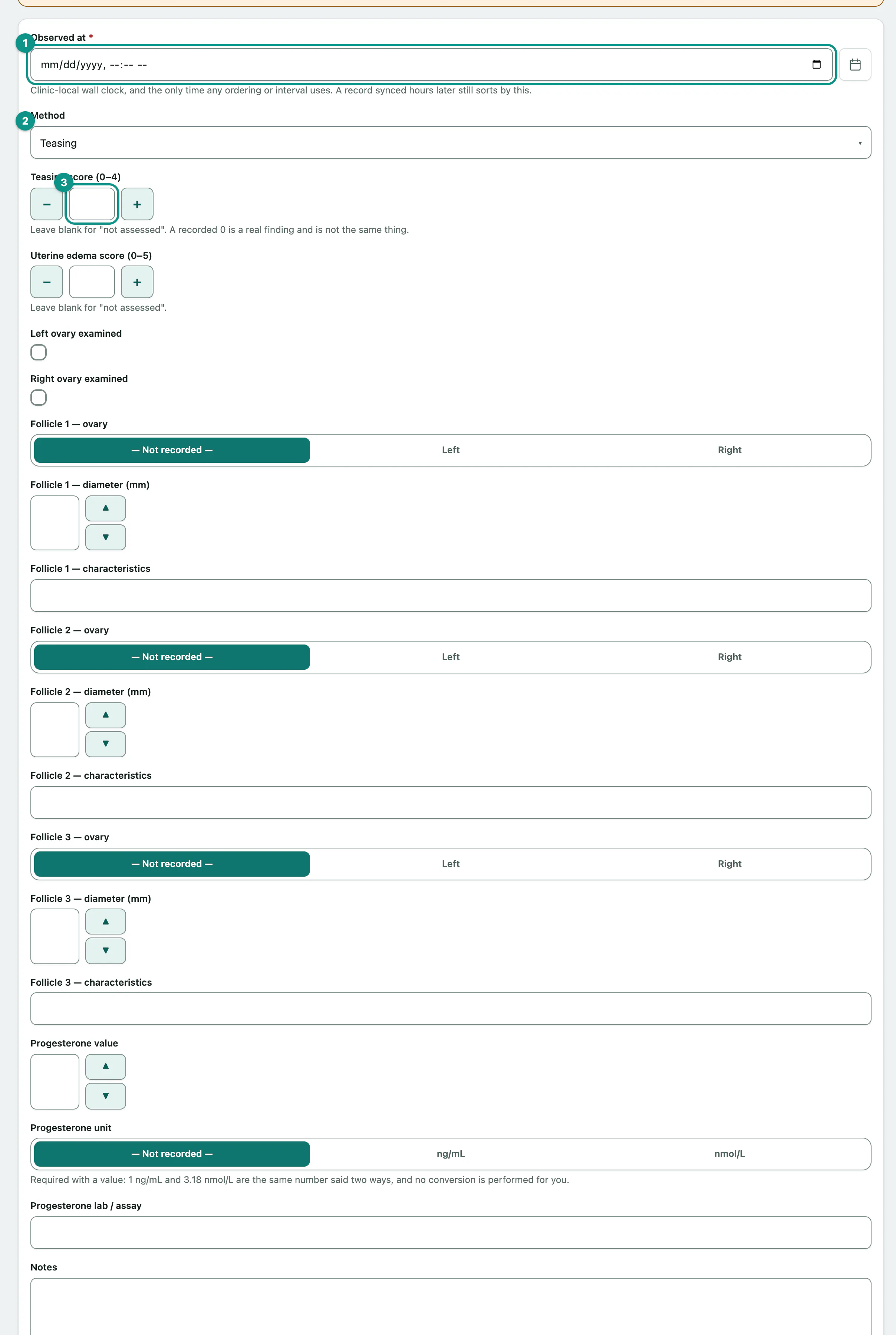
For a progesterone result, enter the Progesterone value and choose its Progesterone unit. The unit is required, and Vivetra doesn't convert between ng/mL and nmol/L.
If Vivetra says the observation looks like one already recorded, check it. To save it anyway, tick Record it anyway and save again.
Record an ovulation
- Under Record an ovulation, set Ovulation at.
- Choose How precisely is this known?. Ovulation is usually bracketed by two scans rather than seen, so say so; the predicted window widens to match.
- Select Save ovulation.
Also record the Ovary, Follicle diameter (mm) and Detection method if you have them. The ovulation is attached to the cycle whose dates contain it.
Record a heat cycle
- Under Record a heat cycle, enter the Cycle start date. Any earlier cycle still open is closed the day before.
- Choose the Outcome if you know it. It starts as Unknown.
- Select Save cycle.
Before saving, tick First postpartum cycle (foal heat), Short-cycled (prostaglandin) or Ovulation induced (hCG / deslorelin) if they apply, with the drug and date.
To close an open cycle later, open Close cycle / record the outcome under it in Cycles on record, enter the end date and outcome, and select Close cycle. If she didn't ovulate, record why, such as Anovulatory or Persistent CL.
If a mare is recorded pregnant, you can't open a cycle on her until a pregnancy check with a non-pregnant finding is recorded on her breeding record (see Record a covering and pregnancy checks).
Records whose date falls outside every cycle wait under Not assigned to a cycle, where you can Assign them to the right one.
Set her reproductive status
Her status is your call, not a calendar guess.
- Under Set reproductive status, choose the Status: Cycling, Spring Transition, Anestrus, Autumn Transition or Not Cycling Medical, and enter the Effective from date. A reason is required for Not Cycling Medical.
- Select Save status.
Record estrus suppression
- Under Record a suppression episode, enter the Drug, the Prescription if it's on file, and the Start date. Leave End date blank while she's still on it.
- Select Save suppression episode.
When she comes off it, open Record withdrawal on the episode in Estrus suppression episodes and enter the withdrawal date.