
Livestock
Manage animal lots
In Vivetra: Livestock › Animal Lots
On this page
A lot is a group of animals you manage and treat as one unit, such as a pen of feeder steers, identified by a USDA group/lot identification number (GIN) rather than by individual tags. You create lots, record what happens to them, and watch their withdrawal dates on Livestock › Animal Lots.
By default, veterinarians, front-desk coordinators and practice managers can create lots and record lot events. Everyone can see the roster.
The lot roster
- Select Animal Lots in the Livestock menu.
- To narrow the list, type in GIN / lot ID contains, or use the operation, client and Status filters, then select Search.
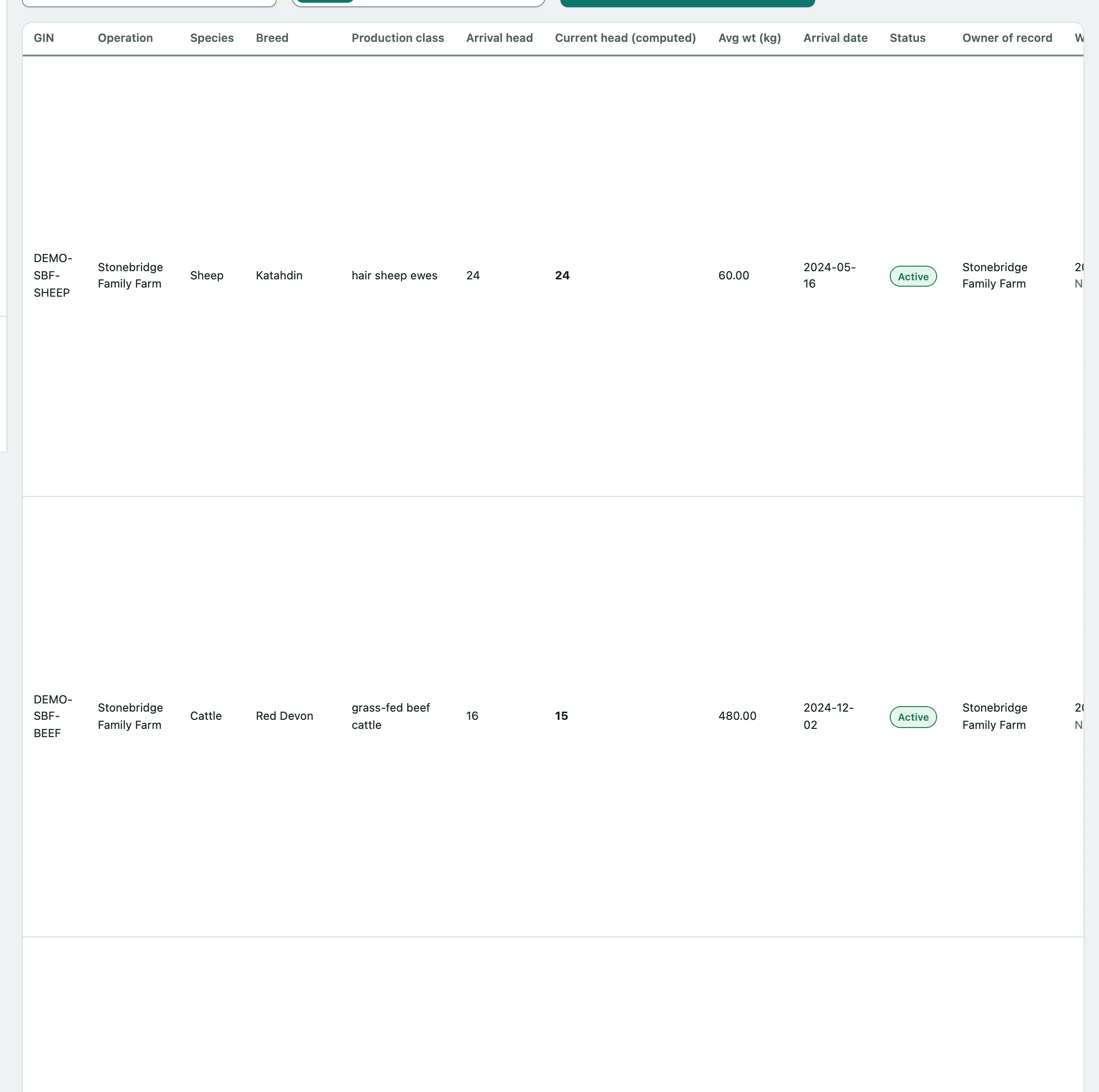
Each row shows the lot's operation, species, breed, production class, arrival head count and average weight. A few columns need explaining:
| Column | What it means |
|---|---|
| Current head (computed) | The arrival head count plus every recorded lot event. You never type it in. |
| Withdrawal through — whole lot (incl. merged lineage) | The latest withdrawal date from treatments given to the whole pen, including lots merged into this one. That date holds every animal in the lot. |
| Individual animals under withdrawal | Animals treated on their own (a pull) that are still under withdrawal. These hold only that animal, not the pen. |
A lot can be clear as a whole while a few tagged animals in it are not, so check both before shipping. Where it applies, the export slaughter interval is shown under the withdrawal date.
The Treatments column links to the lot's ledger (see Record a group treatment), quarantine (see Put a lot under a quarantine hold) and authorizations (see Record a treatment authorization).
Create a lot
You need an operation first (see Set up farm clients, operations and premises).
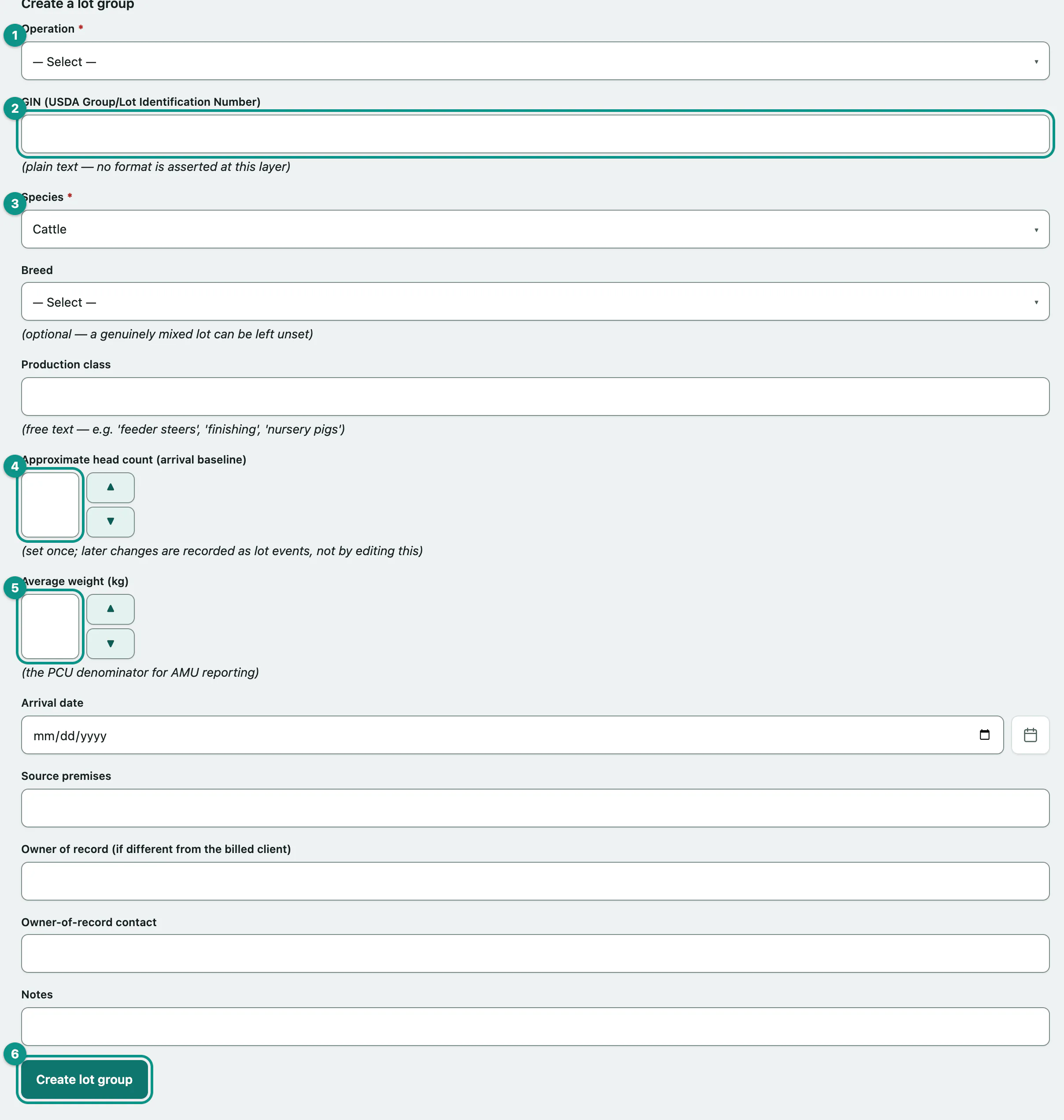
- Under Create a lot group, choose the Operation.
- Enter the GIN (USDA Group/Lot Identification Number) if the lot has one.
- Choose the Species, and a Breed if the lot has a single breed.
- Enter the Approximate head count (arrival baseline).
- Enter the Average weight (kg). The Read the antibiotic use report uses it, so a lot without one can't be counted there.
- Add the production class, arrival date, source premises and owner of record if you have them, then select Create lot group.
Pull one animal out of a lot
When one animal needs to be tracked on its own, for example a sick steer pulled from the pen, pull it out. Vivetra creates an individual patient for it and takes one head off the lot. Find the lot's row in the roster; pulling is only offered on active lots.
- In the Pull one animal column, enter the Animal ID, usually its ear tag. Add a name and Official ID type if you want.
- Check the Event date and select Pull.
The confirmation names the new patient number. Its lot treatment and withdrawal history stays reachable through the lot it came from (see Track an individual animal).
Record a sale, death, merge or depopulation
- Under Record a lot event — merge / sale / death / depopulation, choose the Lot group.
- Choose the Event type: Merged in (another lot merges into this one), Sold, Died, Depopulated or Other.
- Enter the Head count and the Event date, and add a reason if you like.
- Select Record event.
Before you save: for a merge, choose the Lot being merged in (required only for "Merged in"). For Other, choose a Direction (only for "Other"). To change the lot's status at the same time, choose it in Also set this lot's status to (optional).
A merge closes the lot being merged in automatically, and this lot inherits its withdrawal history.
For a death or depopulation by euthanasia, veterinarians and practice managers also see Euthanasia carcass disposition (died / depopulated only, optional). Tick Record a euthanasia carcass disposition for this event and fill in the disposal method, the date and whether the carcass was marked.
See a lot's history
- Under Lot event history, choose the lot in Lot group.
Every split, merge, sale, death and depopulation is listed with its head-count change, who recorded it and any carcass disposition.
Fix a typo on a lot
Select edit in the lot's row. You can correct the GIN, species, breed, production class and arrival head count, then select Save changes. Current head and status only change through lot events.
Issue a group movement certificate
A Tier-2 movement certificate covers a whole GIN group moving together, rather than listing each animal. Only veterinarians can issue one. For a single animal, use Record disease tests and movement certificates instead.
- Under Issue a Tier-2 movement certificate, choose the Lot group.
- Choose the Destination type, and fill in the destination state, scope, head count moving, expiry date and certificate number. The Issue date starts at today and the Issuing veterinarian at you; change them if needed.
- Select Record Tier-2 certificate.