
Boarding · Grooming
See boarding and grooming revenue together
In Vivetra: Grooming › Boarding + Grooming Revenue
On this page
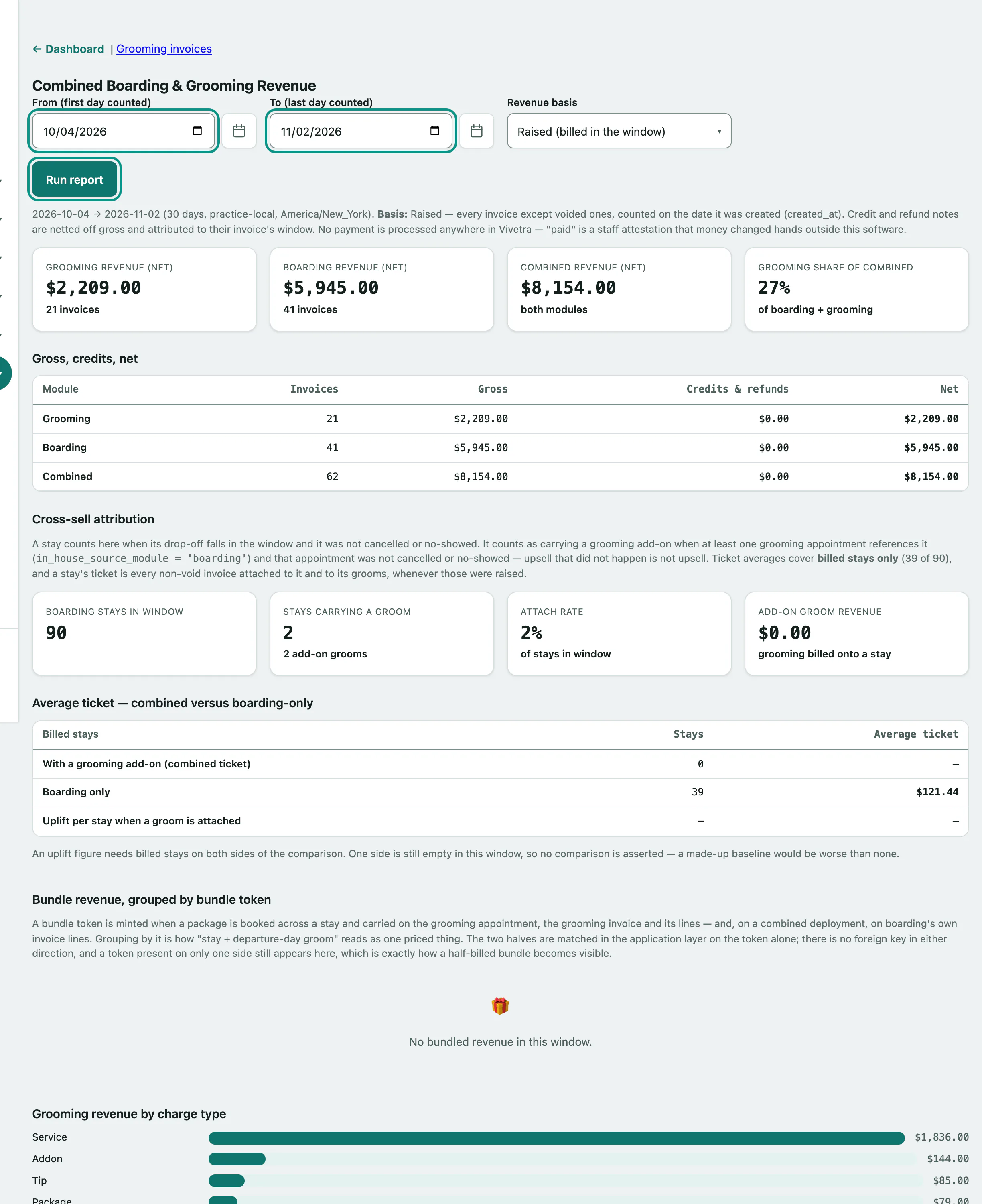
Boarding + Grooming Revenue is one report covering both sides of the business: net revenue for each, how often a stay comes with a groom, bundle revenue, grooming revenue by charge type and by groomer, and clients who use both. It only reads data; nothing on it changes anything.
Only staff with financial-report access see it, usually the practice manager.
Run the report
- In the menu, open Grooming and select Boarding + Grooming Revenue.
- Pick From (first day counted) and To (last day counted). It opens on the last 30 days.
- Choose the Revenue basis: Raised (billed in the window) or Collected (paid in the window).
- Select Run report.
The longest range is 366 days; a longer one is cut down to the 366 days before the end date. Credit and refund notes are taken off gross and counted in their invoice's window.
What's on it
| Section | What it shows |
|---|---|
| Headline figures | Grooming revenue (net), Boarding revenue (net), Combined revenue (net) and Grooming share of combined. |
| Gross, credits, net | Invoices, gross, credits and refunds, and net for each module and combined. |
| Cross-sell attribution | Boarding stays in the window, how many carried a groom, the Attach rate, Add-on groom revenue, and the average ticket with and without a groom. Cancelled and no-show stays and grooms don't count. |
| Bundle revenue, grouped by bundle token | Packages booked across a stay, like a stay plus a departure-day groom, with both halves totalled together. A bundle billed on only one side still appears, so you can spot half-billed bundles. |
| Grooming revenue by charge type | Lines, revenue and share of grooming gross for each charge type. |
| Revenue and tips by groomer | Revenue each groomer produced and tips given to them. |
| Clients on both books | Clients billed by both boarding and grooming, with their combined spend. |
Clients on both books only matches a grooming client and a boarding owner when both records are linked to the same person. Names are never guessed at. A client who isn't linked still counts in the totals; they just don't appear in this table. See Manage grooming clients and Manage boarding owners and their pets.
If your practice doesn't run boarding, the report says Grooming-only report. and shows grooming figures alone.