
Client portal · Shelter
Write in a foster animal's journal
In Vivetra: Animal journal
On this page
Each animal you foster has a journal: one running record that you and the shelter's staff both write in. Use it for how the animal is eating, sleeping, toileting and getting on with your own animals, questions, and anything worrying you.
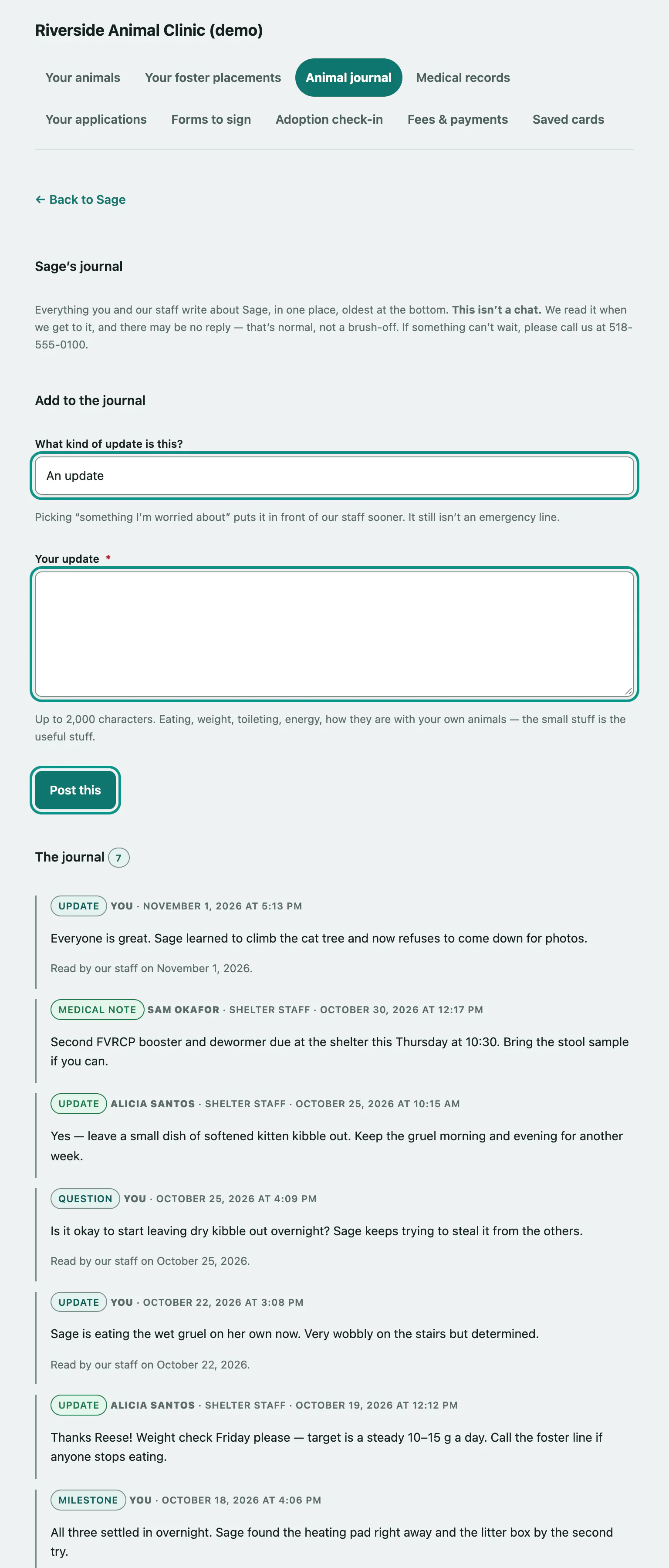
Add an update
- Select Animal journal in the portal menu. With one foster animal, its journal opens straight away. With more than one, select Open the journal on the animal you want.
- Choose What kind of update is this?: An update, A question, Something I'm worried about or A milestone.
- Write it in Your update. You have up to 2,000 characters.
- Select Post this.
You'll see Posted. and your entry appears in The journal below, marked You. Picking Something I'm worried about puts it in front of the shelter's staff sooner.
Reading the journal
Entries are newest first, each with its type, who wrote it, and when. Staff entries are marked shelter staff. Once staff have read your entry, it shows when. Select Show older entries to go further back.
Entries stay on the animal's record permanently, with your name on them, so whoever cares for the animal next knows what you knew. Nothing is deleted.
When an animal goes back to the shelter, its journal leaves your portal. If an animal dies while in your care, its journal stays readable but closes to new entries.