
Hospital
Record a transfusion
On this page
The Transfusion Record holds everything about giving blood to one patient: crossmatch results, each transfusion, and any reaction. Reactions are classified on the four separate TRACS questions rather than a single score.
Recording a crossmatch needs diagnostics access; charting a transfusion or a reaction needs flowsheet charting access. Veterinarians have both. Without either you see the record read-only.
Open the transfusion record
Open it from the stay's Flowsheet: select Transfusion record →. Opened from a stay, the screen shows that stay's transfusions. Crossmatches are always shown for the patient's whole record, because a result from an earlier admission matters before the next unit.
The vitals you take during a transfusion aren't recorded here. Record them on the flowsheet as usual.
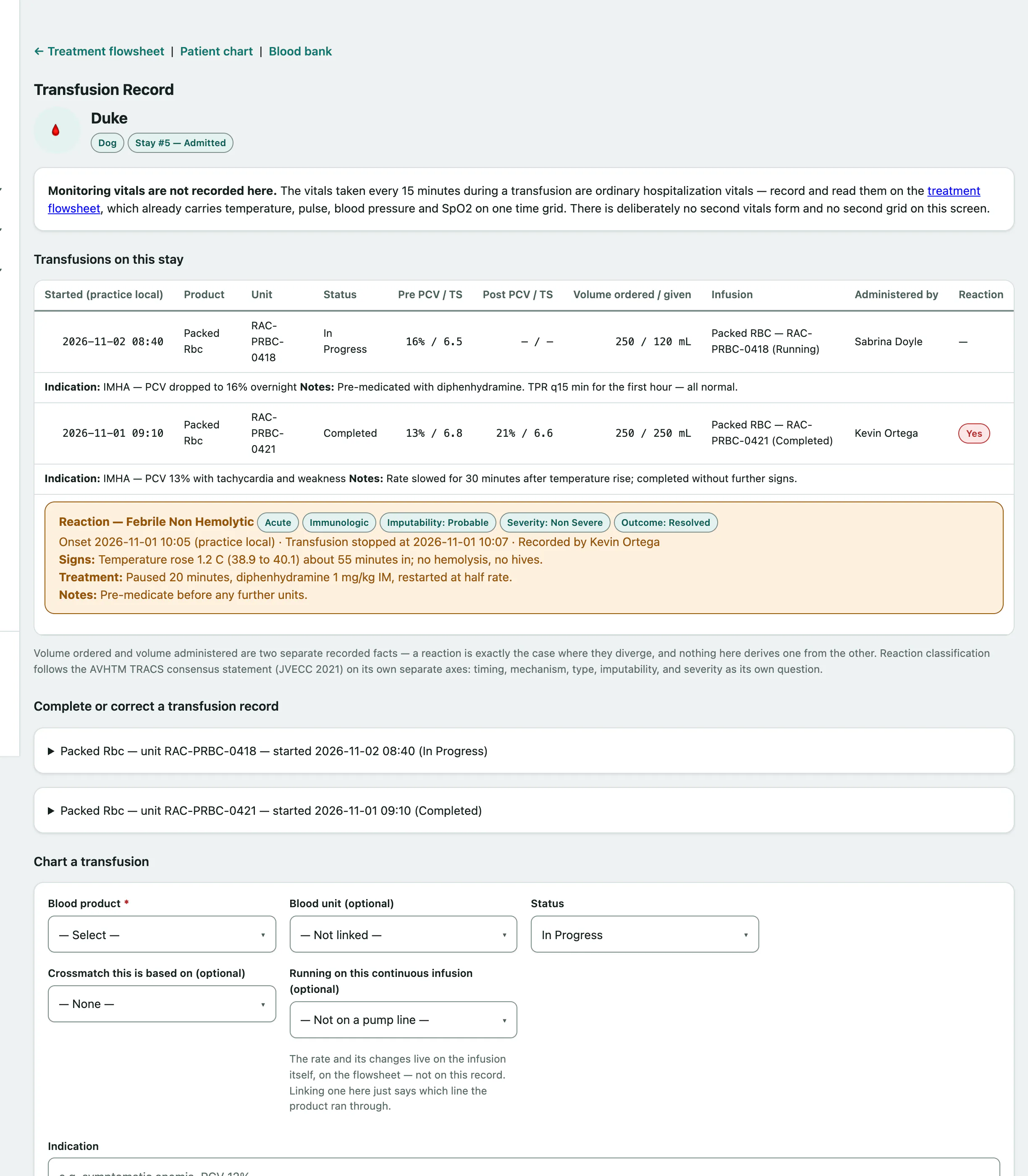
Transfusions on this stay lists each transfusion with its product, unit, status, PCV and total solids before and after, volumes, who gave it and any reaction.
Record a crossmatch
Crossmatch history lists earlier results. To add one:
- Under Record a crossmatch, choose the Crossmatch type and Method.
- Choose the Result: Compatible, Incompatible or Indeterminate. Add the Agglutination grade if you have one.
- Choose the Unit tested against, or a donor for a match before a unit is drawn.
- Select Record crossmatch.
Chart a transfusion
You can chart a transfusion when you've opened the record from a stay.
- Under Chart a transfusion, choose the Blood product.
- Choose the Blood unit (optional) you're giving.
- Choose the Status: Planned, In Progress, Completed, Stopped Reaction or Aborted.
- Choose the Crossmatch this is based on (optional).
- Select Chart transfusion.
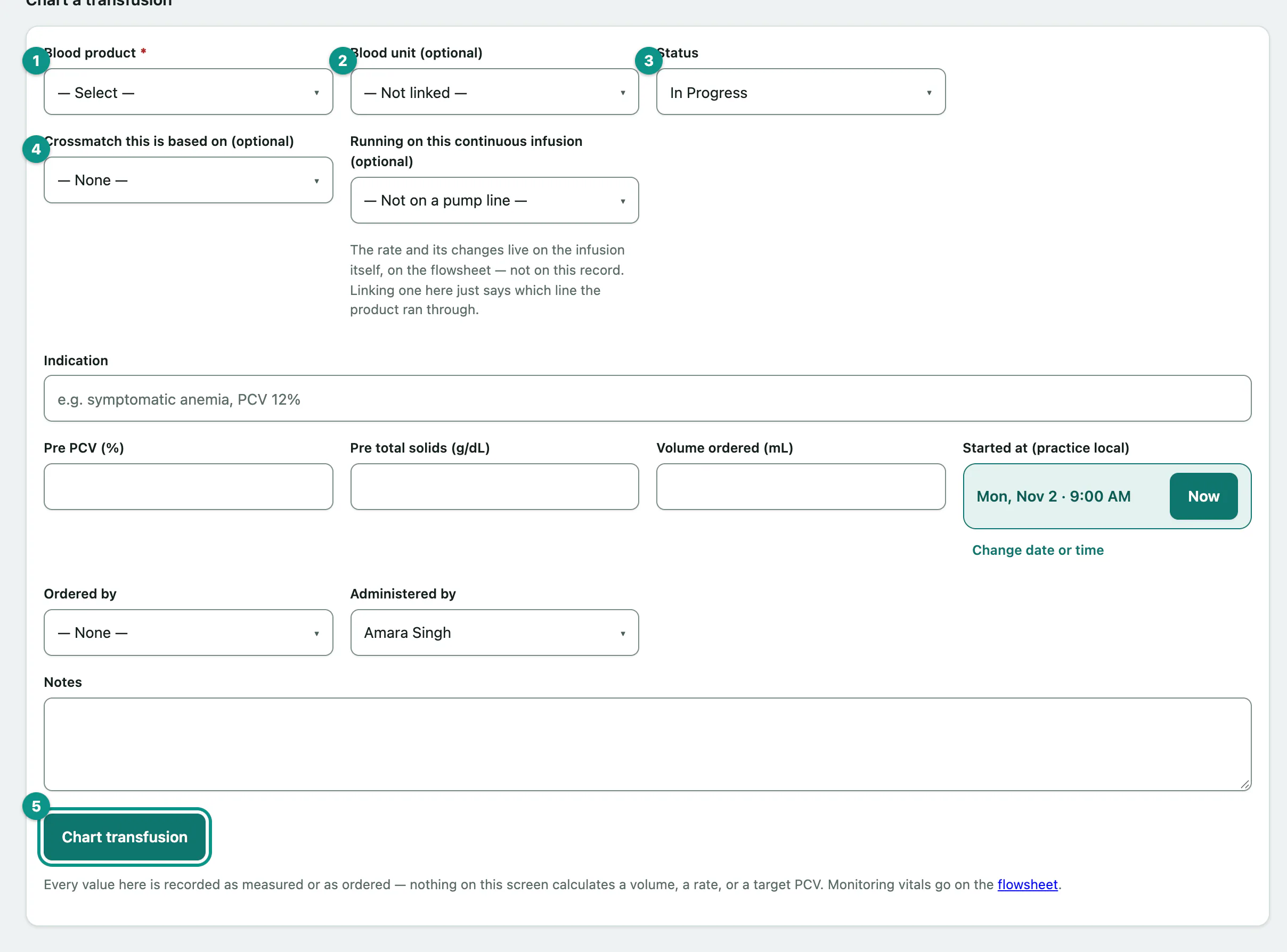
Before charting, fill in what you know: Indication, Pre PCV (%), Pre total solids (g/dL), Volume ordered (mL), Started at (practice local), Ordered by and Administered by. If it's running on a continuous infusion, choose it in Running on this continuous infusion (optional).
Linking a unit updates it in the blood bank: a planned transfusion marks the bag issued, and one that's in progress, completed or stopped marks it transfused. If the bag isn't in the blood bank yet, chart the transfusion anyway, name the bag in the notes and link it later.
Finish or correct a transfusion
- Under Complete or correct a transfusion record, open the transfusion.
- Update the Status, Completed / stopped at (practice local), Post PCV (%), Post total solids (g/dL) and Volume administered (mL).
- Select Save transfusion record.
If someone else changed the same transfusion since you opened the page, your save is refused so their change isn't overwritten. Reload and try again.
Record a reaction
- Under Record a transfusion reaction, choose the Transfusion it happened during, and check Onset at (practice local — defaults to now).
- Under TRACS classification, choose the Timing: Acute — during, or within 24 hours or Delayed — beyond 24 hours.
- Choose the Reaction type.
- Select Record reaction.
Also answer the other TRACS questions if you can: Mechanism (undetermined is the honest default), Imputability — how confident the transfusion caused it, Severity — how bad it was and Outcome. Under What happened, and what was done, record the Clinical signs, tick The transfusion was stopped with the time if it was, describe the Treatment given, and tick Reported onward (QA committee, supplier, registry) if you reported it.