
Boarding · Boarding Scheduling
Book a boarding stay
In Vivetra: Boarding Scheduling › Reservations
On this page
Reservations shows every boarding and daycare stay over a date range, and it's where you book a new one. Use it when an owner calls or walks in to book.
See who's booked
- Open Boarding Scheduling › Reservations.
- Under Date range, set From and To.
- To see only one kind of stay, pick a Status, such as Checked In.
- Select Filter.
It opens on today through the next 14 days. Each day is a column with a count, and each stay shows the pet, its status and stay type, the owner, and the drop-off and pick-up times. Select a stay to open it (see Check a guest in and out).
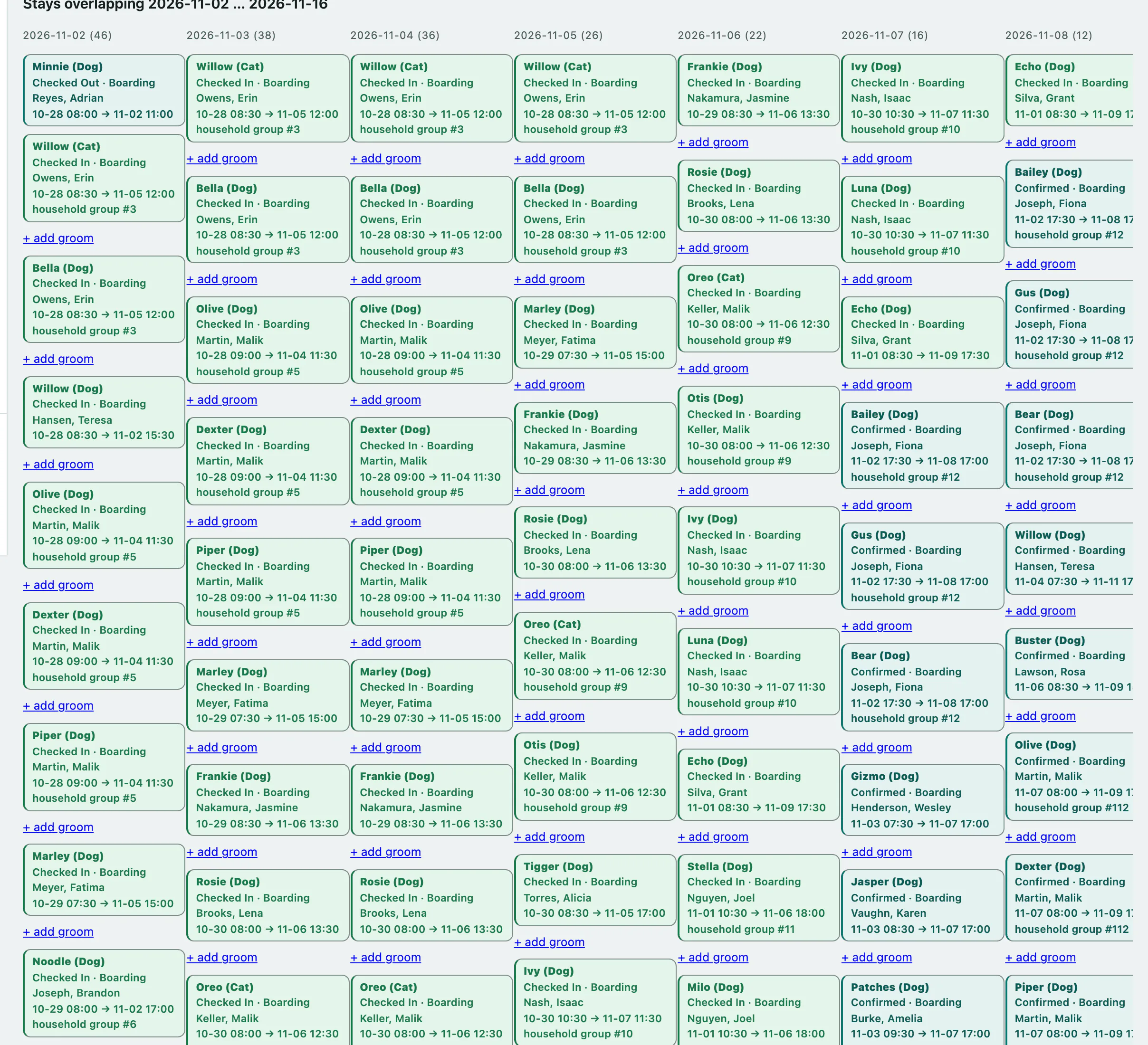
Under a stay you may also see + add groom, which books grooming onto that stay, and + add update, which starts that day's report card (see Send a stay report card). + add update only shows while the pet is checked in.
Book a new stay
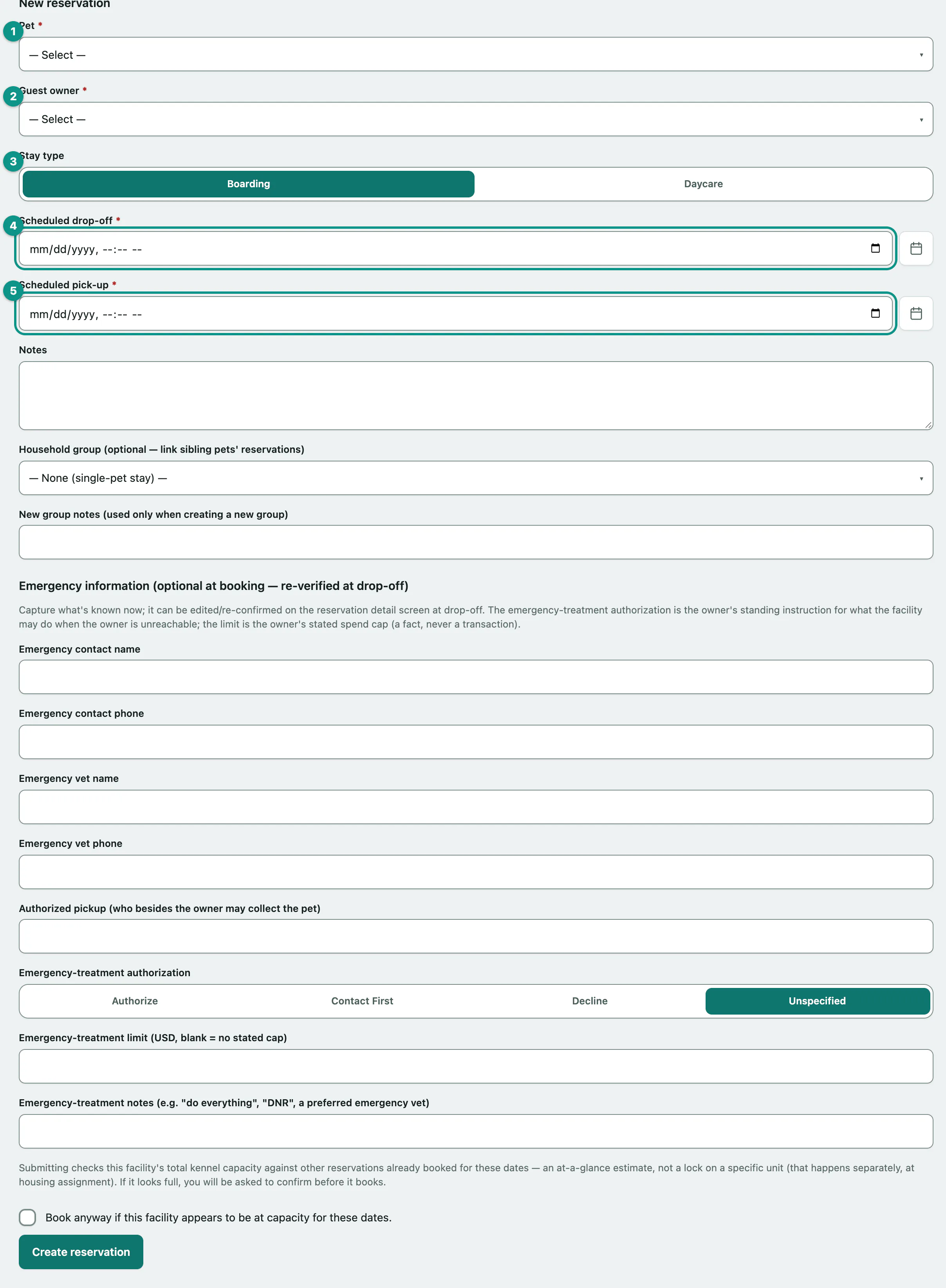
The New reservation form is below the board. You need the pet and the owner on file first. If either list is empty, add them from Manage boarding owners and their pets or the patient record.
- Choose the Pet. Pets of the species your facility boards are listed first, under Recommended (species this facility boards).
- Choose the Guest owner.
- Choose the Stay type: Boarding or Daycare.
- Enter the Scheduled drop-off date and time.
- Enter the Scheduled pick-up date and time. It can't be before the drop-off.
- Add any Notes, then fill in the emergency information if you have it (see below).
- Select Create reservation.
The stay is created as Confirmed and opens on its own page. Vivetra also sends the owner's household a booking confirmation with the drop-off and pick-up times, on whichever channels each person has turned on.
Behavioral history
When you pick a pet that has had a serious incident, or had to be picked up early, on an earlier stay, a Behavioral history (soft — staff decides, not a block): panel lists the most recent ones, with a link to the full incident log. It never stops the booking; it's there so you can decide. A pet with nothing on file shows Nothing on record instead.
Booking siblings together
To link several pets from one household, use Household group (optional — link sibling pets' reservations). For the first pet choose + Create a new household group for this guest owner, and you can add New group notes (used only when creating a new group). For each sibling, pick that group from the same list. The group must belong to the same owner. Each pet still keeps its own status, check-in and check-out.
Emergency information
Under Emergency information (optional at booking — re-verified at drop-off) you can record:
| Field | What it's for |
|---|---|
| Emergency contact name and Emergency contact phone | Who to call if the owner can't be reached |
| Emergency vet name and Emergency vet phone | The owner's preferred vet |
| Authorized pickup (who besides the owner may collect the pet) | Anyone else allowed to collect the pet |
| Emergency-treatment authorization | Authorize, Contact First, Decline or Unspecified: what the owner wants you to do if they can't be reached |
| Emergency-treatment limit | The owner's spending cap. Leave it blank for no stated cap |
| Emergency-treatment notes (e.g. "do everything", "DNR", a preferred emergency vet) | Anything else about treatment |
You can change all of this on the stay at drop-off.
If the facility looks full
When you create a stay, Vivetra adds up the capacity of every active, in-service kennel and counts the confirmed and checked-in stays that overlap your dates. If that looks full, nothing is booked and you see Review before booking — nothing was created.
It's an estimate across the whole facility, not a hold on any one kennel. If you still want to book:
- Tick Book anyway if this facility appears to be at capacity for these dates.
- Select Create reservation again.
Choosing the actual kennel happens later, in Manage rooms, kennels and cleaning.
Messages you might see
| Message | What to do |
|---|---|
| Select a pet. / Select a guest owner. | Choose one from the list. |
| Pick-up cannot be before drop-off. | Check the two dates. |
| Emergency-treatment limit must be a dollar figure like 500 or 500.00 (leave blank for no stated cap). | Enter numbers only, no currency sign. |
| That household group belongs to a different guest owner — select the matching owner or create a new group. | Pick the right owner, or start a new group. |
Only staff who can manage reservations see the New reservation form. Everyone else sees the board only.