
Hospital
Write treatment orders
On this page
Treatment orders are the instructions for an admitted patient's care: medications, fluids, feeding, walks, monitoring and procedures. When you give an order a dosing interval, Vivetra creates every scheduled dose up front, ready to be checked off on the flowsheet.
Only staff with ordering authority can write orders. Veterinarians and practice managers can; everyone else sees the orders read-only. New orders can only be entered while the stay is admitted.
Open a stay's orders
- On the ward board, find the patient's card and select Treatment orders.
Right after admitting a patient, you can also select Enter treatment orders on the confirmation.
The Orders table lists every order on the stay with its type, frequency, interval, start and end times, status, and Scheduled (pending): how many doses were scheduled and how many are still to do. The patient's recorded allergies are shown above it.
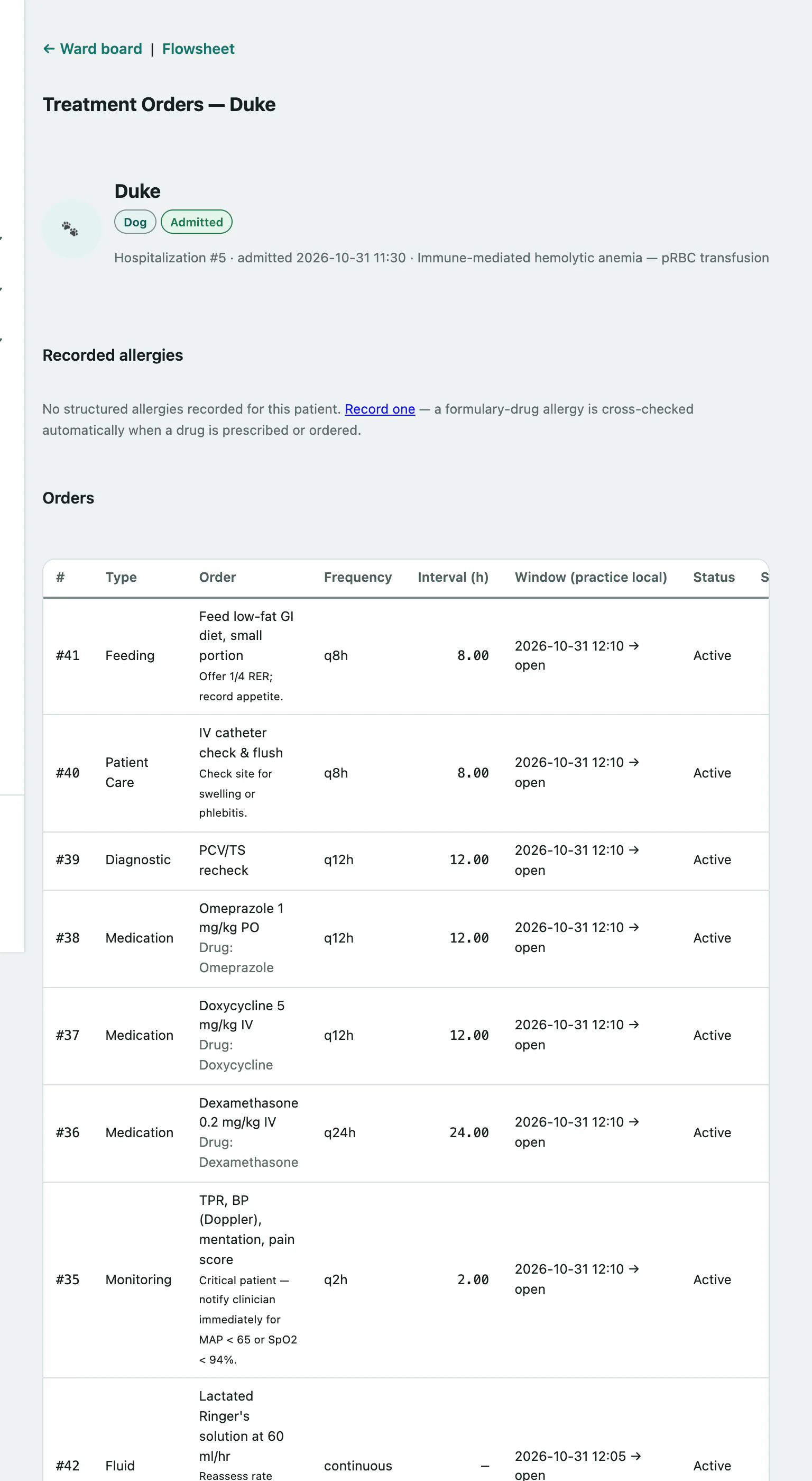
Doses are checked off on the stay's Flowsheet, linked at the top of the page.
Write a new order
- Under New treatment order, choose the Order type, such as Medication, Fluid, Feeding or Continuous Infusion.
- In Order, type what's being given or done, for example "Cefazolin 22 mg/kg IV".
- For a drug order, choose the drug in Drug (optional).
- To schedule doses, enter the Dosing interval — hours (optional), for example 4 for every four hours.
- Check Starts at (practice local) (it's set to now) and set Ends at (practice local).
- Select Create order.
You can also add Instructions (optional) and a Frequency label (optional) such as "q4h" or "BID" before creating it.
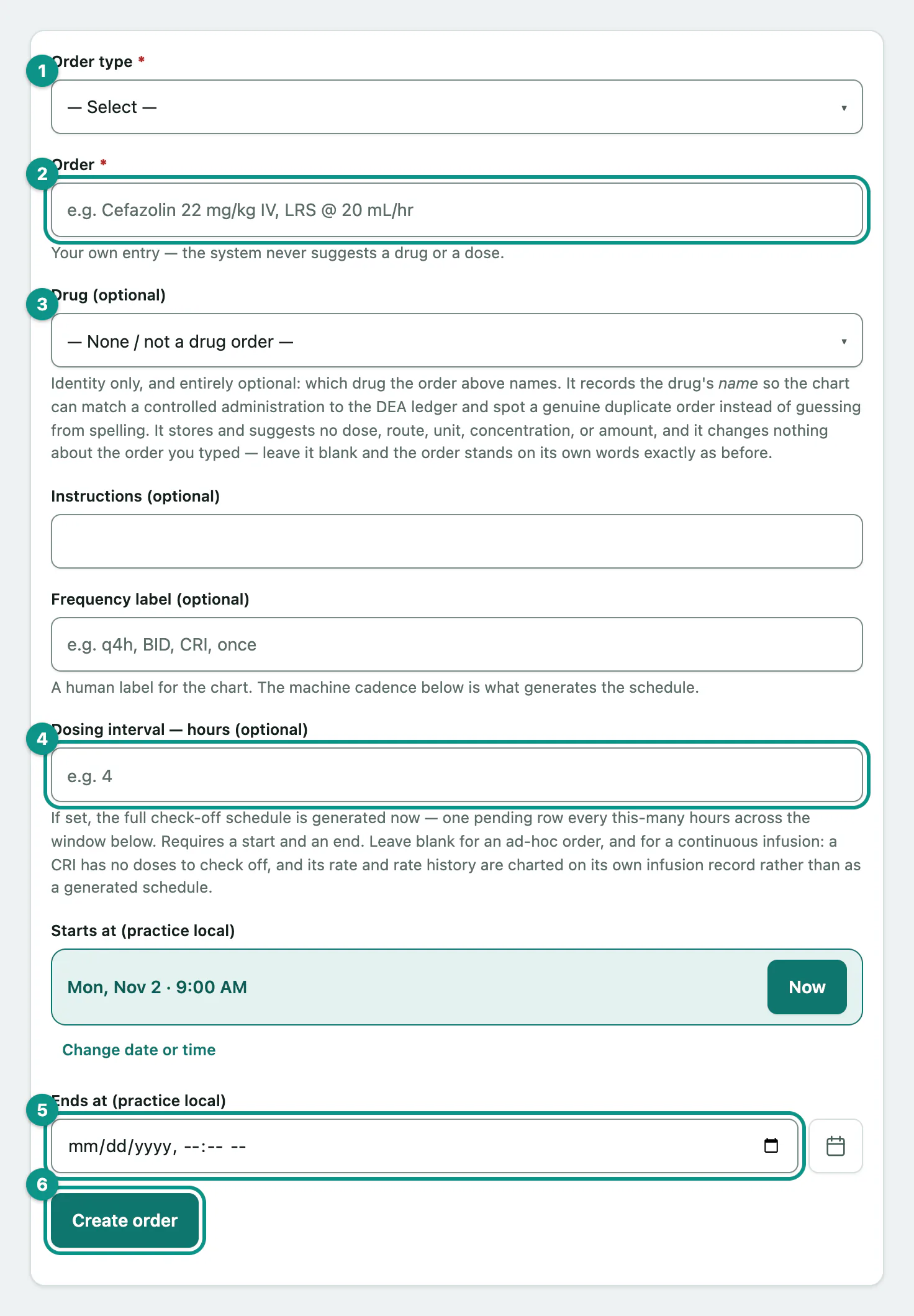
Vivetra never suggests a drug or a dose. The order is what you type. Choosing a Drug (optional) only records which drug it is, so controlled-drug administrations can be matched to the register and real duplicate orders can be spotted.
How the schedule works
- With a dosing interval, you need both a start and an end time. One pending dose is created every interval across that window, up to 2,000.
- Without an interval, the order is ad hoc: no doses are scheduled.
- Leave the interval blank for a continuous infusion. Its rate is charted on its own infusion record instead.
- Frequency label (optional) is only a label for the chart. The interval is what creates the schedule.
The scheduled doses feed the flowsheet and the ward board's overdue count and conflict checks (see Use the ward board › Read the board).
Controlled drugs
When the drug you choose is a controlled substance, Stocked controlled product (optional) lets you record which stocked product the order is against. This doesn't make a register entry. Administrations are still recorded separately in the controlled drug register.
Allergy warnings
If the patient has a recorded allergy to the drug you chose, the order isn't created and you see ALLERGY WARNING — order NOT created. To order it anyway, tick that drug's box under Recorded drug allergies — acknowledgement and select Create order again.
Boarding aftercare stays
If the stay is a medical aftercare stay for a boarding reservation, the page says Boarding aftercare stay. Orders here are transcriptions of an outside vet's written orders, not new prescriptions. Record who wrote them in Ordering source / provenance (boarding aftercare).
When the stay ends, its active orders are discontinued and pending doses are skipped automatically (see End a hospital stay).