
Shelter
Run your foster program
In Vivetra: Shelter › Foster
On this page
Foster is where you keep your list of foster caregivers and record which animals are out in foster homes, and when they come back.
Anyone signed in can view the screen. Adding caregivers, placing animals and closing placements needs foster permission. Without it you see the message that the console is read-only for you.
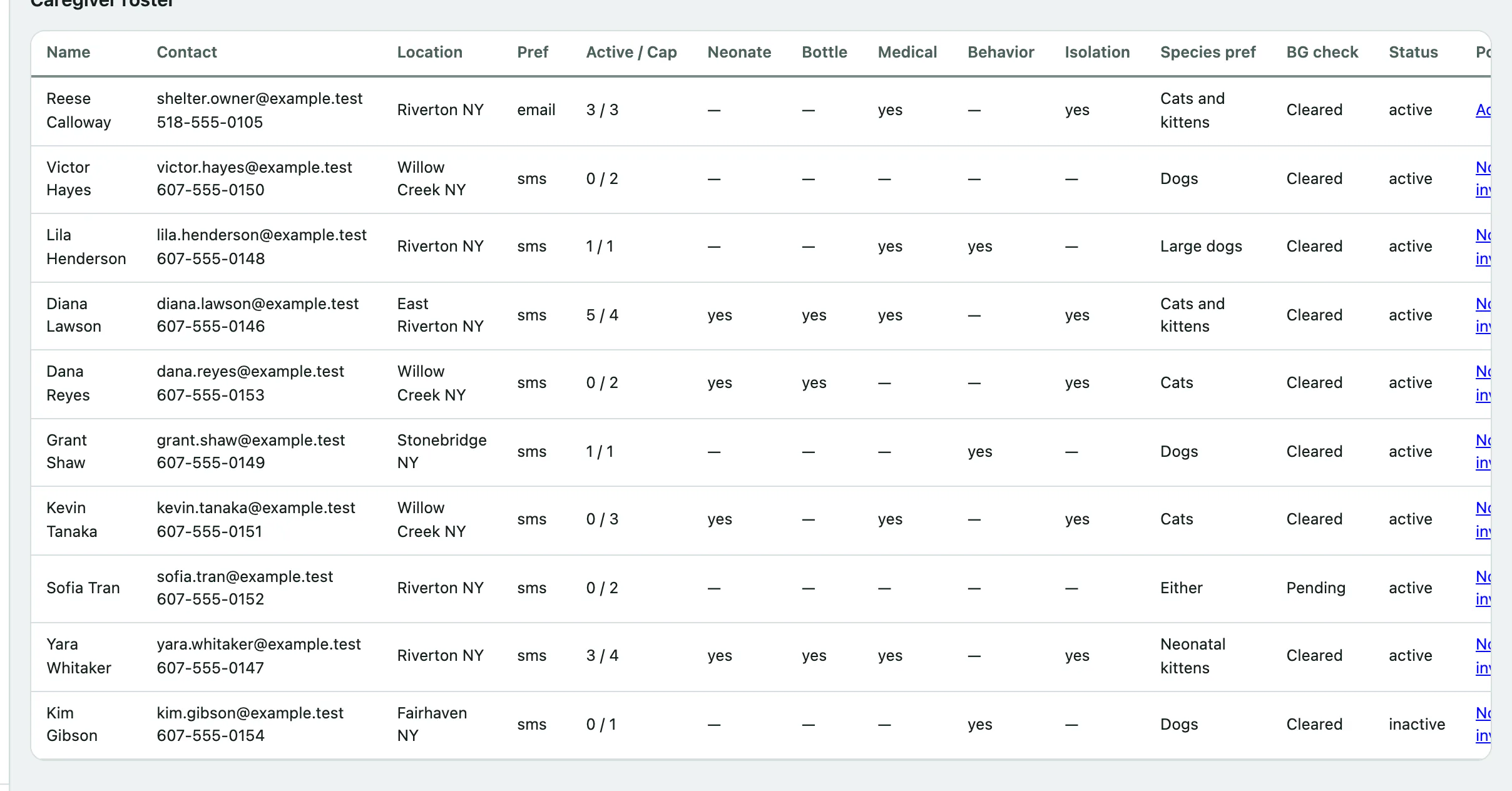
The caregiver roster
Caregiver roster lists every foster home. For each caregiver you see their contact details and location, Active / Cap (how many animals they have now against the most they'll take, or ∞ if no limit was set), what they're able to take (Neonate, Bottle, Medical, Behavior, Isolation), their Species pref, BG check status and whether they're active. The Portal column shows whether they have a client portal account (see Give adopters and fosters portal access).
Add a caregiver
- Select Foster in the Shelter menu.
- Under Add a caregiver, enter the caregiver's First name and Last name. These are the only required fields.
- Fill in their contact details and address, Preferred contact and Max animals. Leave Max animals empty for no limit.
- Tick what they can take on: Can foster neonates, Can bottle-feed, Can foster medical, Can foster behavior and Has isolation space.
- Choose their Background check status.
- Select Add caregiver. You'll see "Foster caregiver added to the roster."
Untick Active for a home that isn't taking animals at the moment. Experience notes and Notes are for your team.
Place an animal in foster
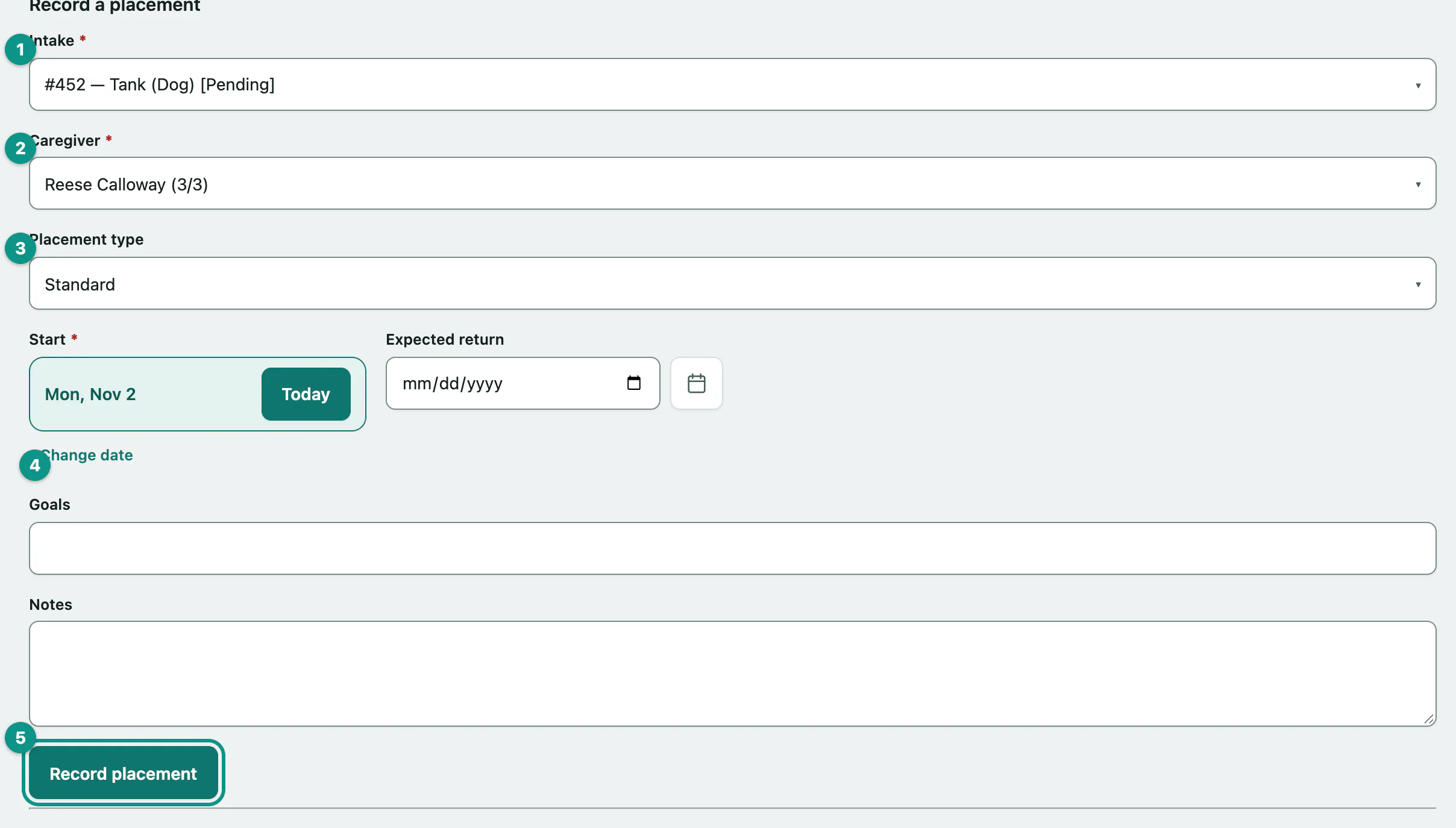
- Under Record a placement, choose the Intake. The list shows every animal whose intake isn't finalized, with its current status.
- Choose the Caregiver. Each name shows how many animals they have and their capacity, for example (1/3).
- Choose the Placement type: standard, neonatal bottle baby, medical, behavioral, hospice or emergency surge.
- Set the Start date. Add an Expected return date, Goals and Notes if you have them.
- Select Record placement.
The animal's intake status changes to in foster. When it comes back, the intake goes back to the status it had before.
Record a placement only appears once you have at least one active caregiver and an animal that can be placed.
When Vivetra warns you first
Vivetra checks the match before it saves, and stops with "Review before placing — the placement was NOT recorded." if something looks wrong. The warnings cover:
| Warning | What it means |
|---|---|
| BACKGROUND CHECK DECLINED | The caregiver failed their background check. Don't go ahead without manager sign-off. |
| BACKGROUND CHECK NOT CLEARED | Their check hasn't been cleared yet. |
| Marked INACTIVE | The caregiver isn't taking placements at the moment. |
| CAPABILITY | The placement type needs something the caregiver isn't marked able to do, such as bottle-feeding for a bottle baby, or medical care for a medical or hospice placement. |
| ISOLATION | The animal needs isolation and the caregiver has no isolation space. |
| OVER CAPACITY | The caregiver is already at their Max animals. |
| OUTCOME-FINALIZED | The intake already has an outcome. |
An emergency surge placement skips the capability checks. It only warns if the caregiver has no capabilities marked at all.
These are warnings, not blocks. To place anyway:
- Read each warning, then tick I've reviewed the warning(s) above and want to place anyway.
- Select Record placement again.
Bring an animal back from foster
Active placements lists every animal out in foster now, with its caregiver, type, start and expected return.
- In the animal's row, under Return / close, choose how the placement ended: returned, transferred or ended other.
- Check the return date next to it, which defaults to today, then select Close.
Closed placements move to Recently closed placements with the date and outcome.
To message a caregiver about an animal in their care, select Open in the Journal column (see Use the animal journal with a foster caregiver).