
Records & admin · Records
Manage callback tasks
In Vivetra: Records › Callback Tasks
On this page
Callback Tasks is the staff to-do list for patients: the day-after call following surgery, a recheck in two weeks, chasing a lab result. It's for the team, not the client. Reminders that go to owners, like vaccines due, are Work the patient recall list.
Everyone can see the list. Creating and closing tasks needs follow-up task permission, which front desk, veterinarians and practice managers have.
Add a task
- Select Records › Callback Tasks in the menu.
- Under New follow-up task, choose the Patient.
- Choose the Kind: callback, recheck, lab follow-up or other.
- Say what needs doing in Description.
- Set Due on and, if it's someone's job, Assign to. Leave it — Unassigned — for whoever gets to it.
- Select Create task.
Close a task
Tasks lists every task with its patient, visit, kind, due date, status and who it's assigned to.
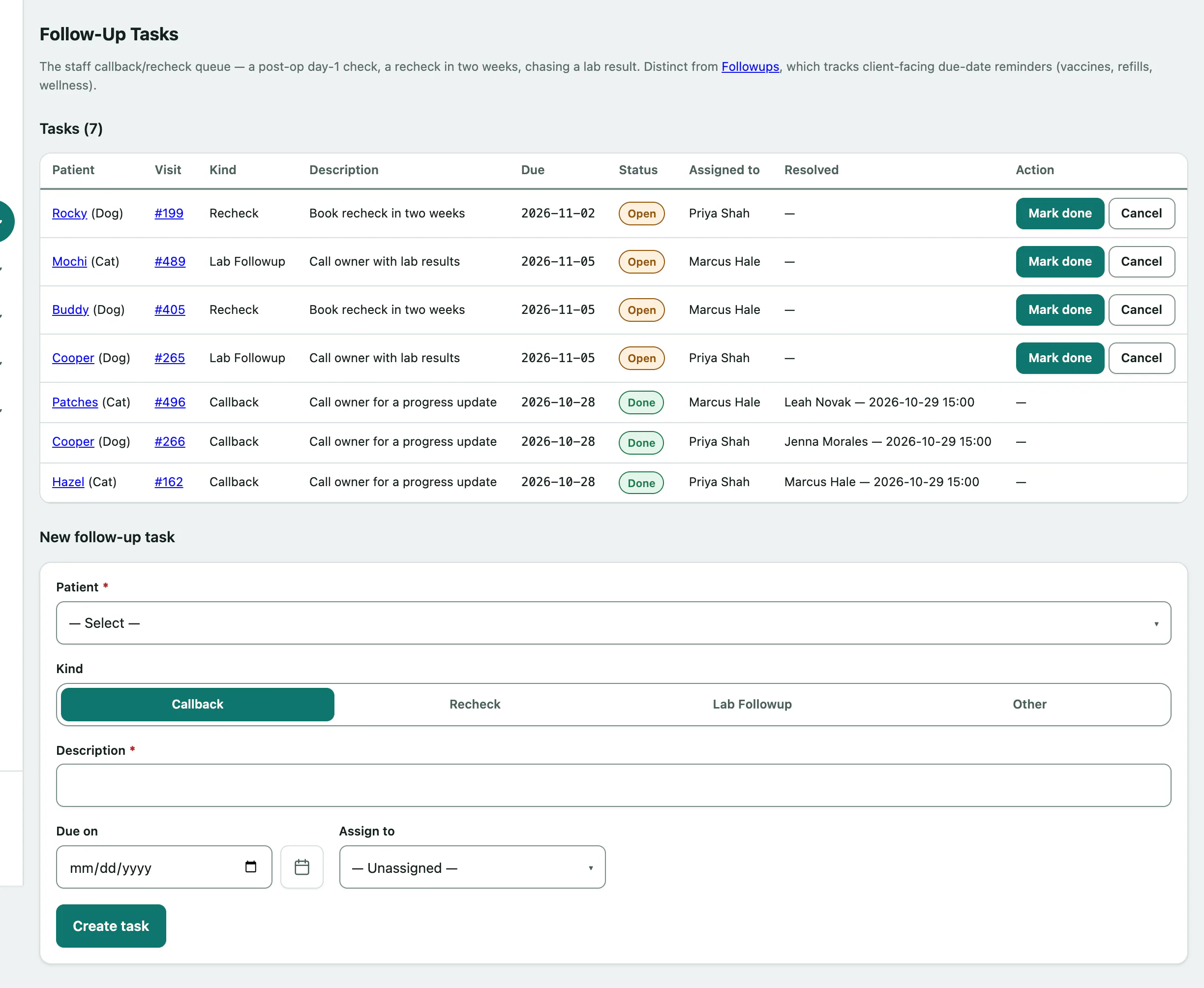
- When it's done, select Mark done on its row. If it's no longer needed, select Cancel instead.
Closed tasks stay on the list with who closed them and when, under Resolved. If someone else closed it first, you'll see This task is no longer open — it may have already been resolved.