
Client portal · Boarding
Buy and use prepaid credit
In Vivetra: Prepaid credit
On this page
Prepaid credit is money or visits you buy up front, such as a boarding credit or a daycare pass, and spend on later bills. Prepaid credit shows your balance, what it's made of, the packages you can buy and your history.
Check your balance
- Select Prepaid credit in the portal menu.
- Look at Credit available. Boarding and daycare credit is shown separately from grooming credit.
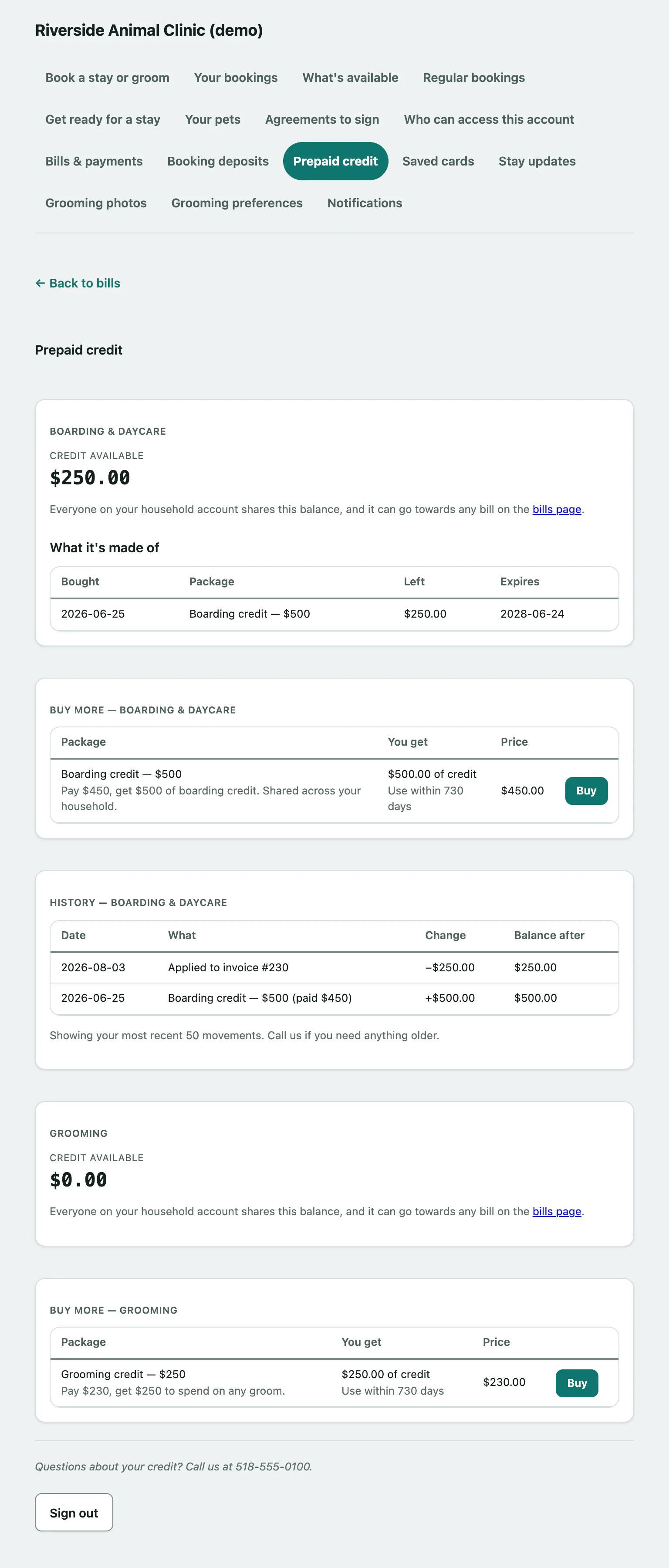
Everyone on your household account shares the balance. What it's made of lists each package you've bought, when, what's Left and when it Expires. Packages counted in visits show the visits left rather than an amount.
History lists your most recent 50 credit movements, with the change and the Balance after. Call the facility if you need anything older.
Buy a package
Under Buy more, find the package. The table shows what You get, any Use within … days limit and the Price.
- Select Buy next to it, then finish on the payment provider's secure page.
When you come back, the page says Your credit balance below is up to date. and the new credit is in your balance.
Spend your credit
You use credit when you pay a bill: leave the credit box ticked on the bill (see Pay a boarding or grooming bill › Pay a bill). Credit can't be used for a tip.
If the page says Prepaid packages aren't available on your account right now, the facility doesn't sell packages online. Call them to buy one.