
Client portal · Boarding
Pay a boarding or grooming bill
In Vivetra: Bills & payments
Bills & payments lists every boarding and grooming bill on your account, paid or not. You can pay a bill in full online, use prepaid credit towards it and add a tip for the team.
See your bills
- Select Bills & payments in the portal menu.
Each bill shows whether it's for Grooming or Boarding, its date, the bill number and the total. Its pill says Paid or Balance due. If you have prepaid credit, your balance is shown at the top under Prepaid credit on your account.
Pay a bill
Payment always covers the whole bill. Some options only appear when the facility offers them.
- On a bill marked Balance due, leave Use … of your prepaid credit on this bill ticked to put your credit towards it, or untick it to pay it all by card. This only shows when you have credit.
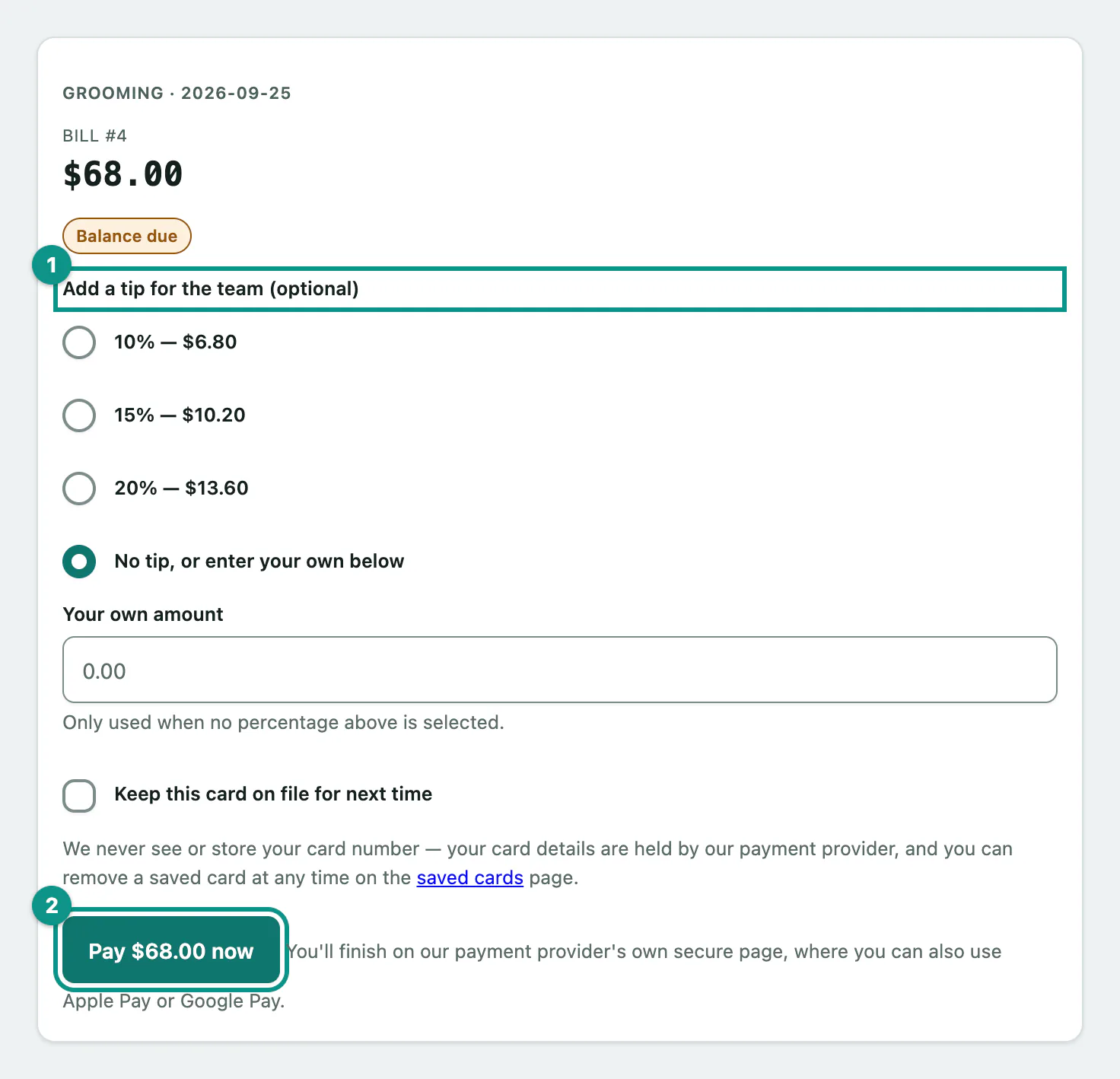
- Under Add a tip for the team (optional), choose a percentage, or leave No tip, or enter your own below selected and type an amount in Your own amount.
- Tick Keep this card on file for next time if you'd like to save the card you pay with. It's off unless you tick it.
- Select Pay … now. The button shows the bill's total. You then enter your card on the payment provider's secure page, or use Apple Pay or Google Pay where the page offers them.
When you come back, the bill shows Paid. If your prepaid credit covers the whole bill, nothing is charged to a card and you see Paid in full from your prepaid credit — nothing was charged to a card.
If a bill still shows Balance due
If you paid but the bill hasn't caught up, select Already paid? Check status on the bill. Vivetra asks the payment provider again and updates the bill.
If you see We received your payment, but this bill changed after you started checking out, don't pay again. The facility will review the bill and update your balance.
| Message | What it means |
|---|---|
| That bill is already paid, or is no longer payable. | Someone has already paid it, or the facility changed it. Reload the page. |
| We couldn't find that bill — please refresh and try again. | Reload the page and try again. |
| Too many attempts — please wait a few minutes and try again, or call us. | Wait a few minutes. |
| This practice has no online payment address configured yet — please call us. | The facility can't take payments online yet. Pay by phone or at the desk. |
Pay from a text message link
The facility may text you a link to pay a bill, deposit or package without signing in.
Open the link. The page shows the facility's name, what the payment is for and the Amount due.
- Select Pay … now and finish on the payment provider's secure page.
You'll see Thank you — your payment went through. when it's done, or This has already been paid. Nothing more to do. if you open the link again. If you see This payment link isn't available any more., the link has expired or been paid; call the facility.