
Shelter
Report to Shelter Animals Count
In Vivetra: Shelter › Shelter Animals Count
Shelter Animals Count builds your monthly figures for Shelter Animals Count's Intake & Outcome Database, lets you check and freeze them, and, if you switch it on, files them for you. It's the only place in Vivetra that sends your figures anywhere.
You need permission to record outcomes to open this screen. If it isn't in your Shelter menu, ask your practice manager.
Turn on filing
Filing is off until someone switches it on. While it's off you can still build and freeze months; they just stay in Vivetra.
- Select Shelter Animals Count in the Shelter menu.
- Under External filing, set Transmit to Shelter Animals Count? to Yes — allow monthly filing.
- Enter your SAC organization identifier. You can't switch filing on without it.
- Select Save.
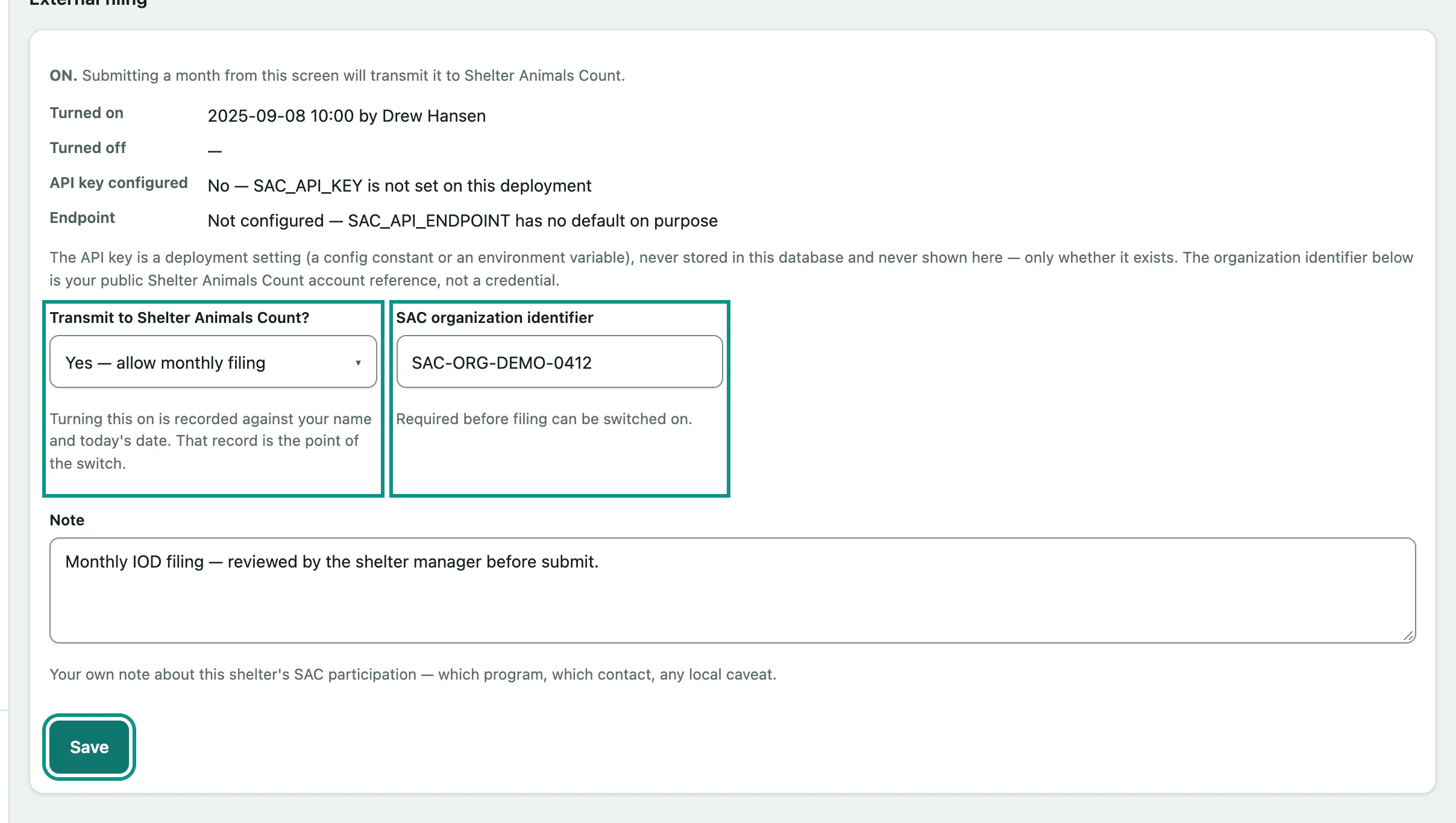
Turning filing on or off is recorded with your name and the date, and the record of it ever being on is kept. The panel also shows whether an API key configured and an Endpoint are in place. Both are part of your clinic's setup, not something you change on this screen, and filing can't go out without them.
Check a month
The screen opens on last month. You can only pick a month that has finished.
- Choose the Reporting month.
- Select Build matrix.
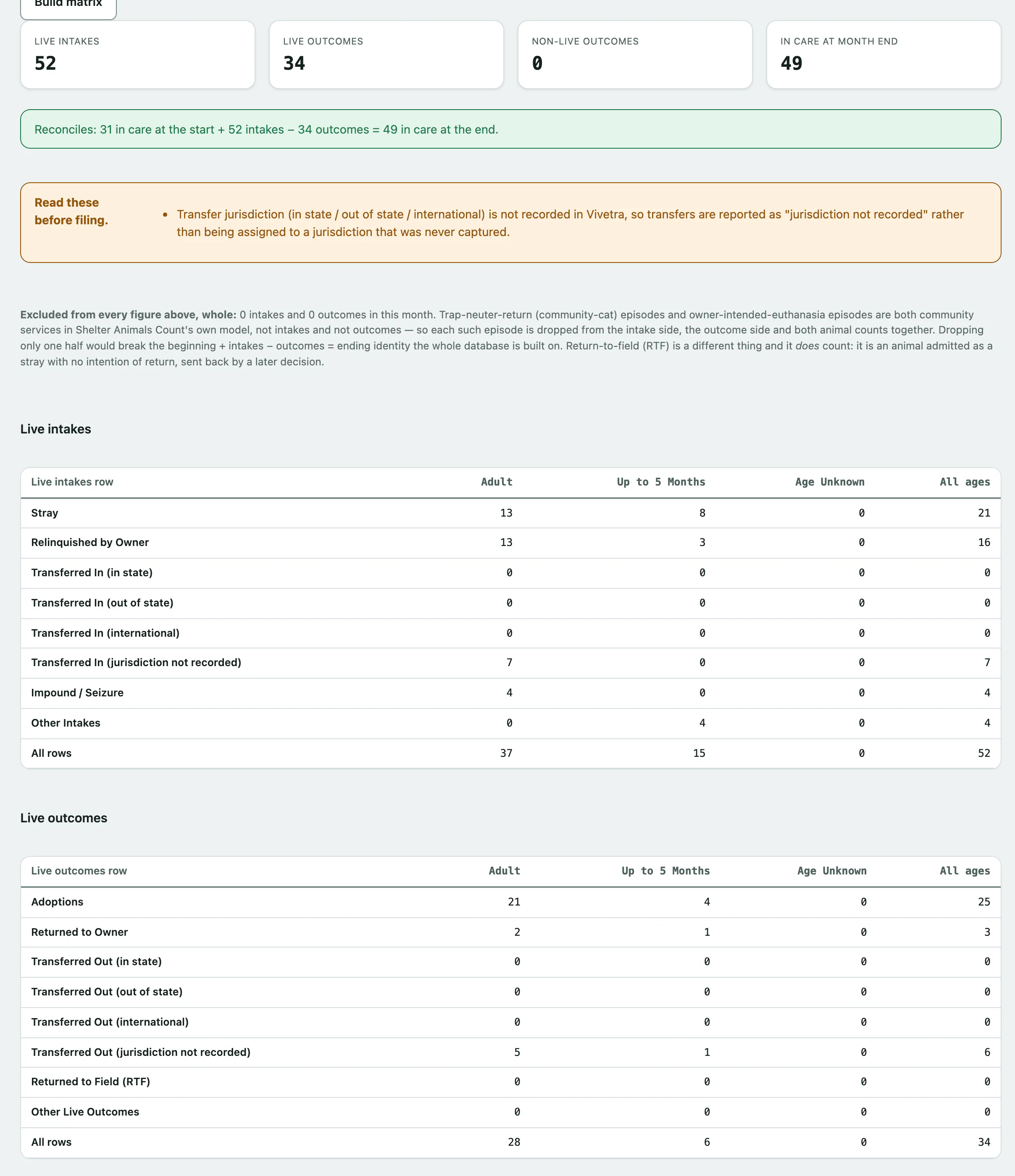
You'll see four tiles (Live intakes, Live outcomes, Non-live outcomes, In care at month end), then a reconciliation check: animals in care at the start, plus intakes, minus outcomes, should equal animals in care at the end.
If it says These figures do not reconcile, find the gap before you file. An outcome dated before its own intake, or a second outcome on one episode, will both cause it. Vivetra never balances the figures for you.
Below that are the Live intakes, Live outcomes, Non-live outcomes and Animal counts tables, split into Adult, Up to 5 Months and Age Unknown. Open Species breakdown to see each species on its own; that's what is actually filed. Read any Read these before filing. warnings too.
Trap-neuter-return and owner-intended-euthanasia episodes are left out of every figure, because Shelter Animals Count treats them as community services. The page shows how many were left out.
Freeze and file a month
Freezing saves the exact figures on screen as a draft. Do this even if you file by hand: if an outcome is corrected later, rebuilding the month won't give the same numbers.
- Under Freeze this month, select the freeze button. It names the month, for example Freeze October 2026 as a draft. Nothing is sent.
- In Submission history, find the draft and select Submit to SAC.
Filing happens while you wait, and the result is written against the row before the page comes back. When it works you'll see Shelter Animals Count's reference. If it fails, the row shows Failed with the reason, and Retry appears.
| Status | Meaning |
|---|---|
| Draft — not sent | Frozen, not filed |
| In flight | Being sent, or the send died part-way |
| Filed | Shelter Animals Count accepted it |
| Failed | Tried and didn't go through; you can retry |
| Superseded | Replaced by a newer submission, which it names |
Correct a month
A month only ever has one live submission. To change it, replace it from its row rather than freezing again.
- In Submission history, find the month and select File a correction on a filed row, or Regenerate on a draft or failed one.
- Select Submit to SAC on the new draft when you're ready.
The new draft is rebuilt from today's data. The old row is marked Superseded and keeps the figures it was filed with. Nothing in the history is ever deleted.
To see exactly what a row holds, select Show what was filed.