
Client portal · Boarding
See, change or cancel your bookings
In Vivetra: Your bookings
On this page
Your bookings lists your confirmed stays and grooming appointments, and the requests you've sent that are still being looked at. From here you can cancel a booking or withdraw a request, if your facility allows it.
What's on the page
Select Your bookings in the portal menu.
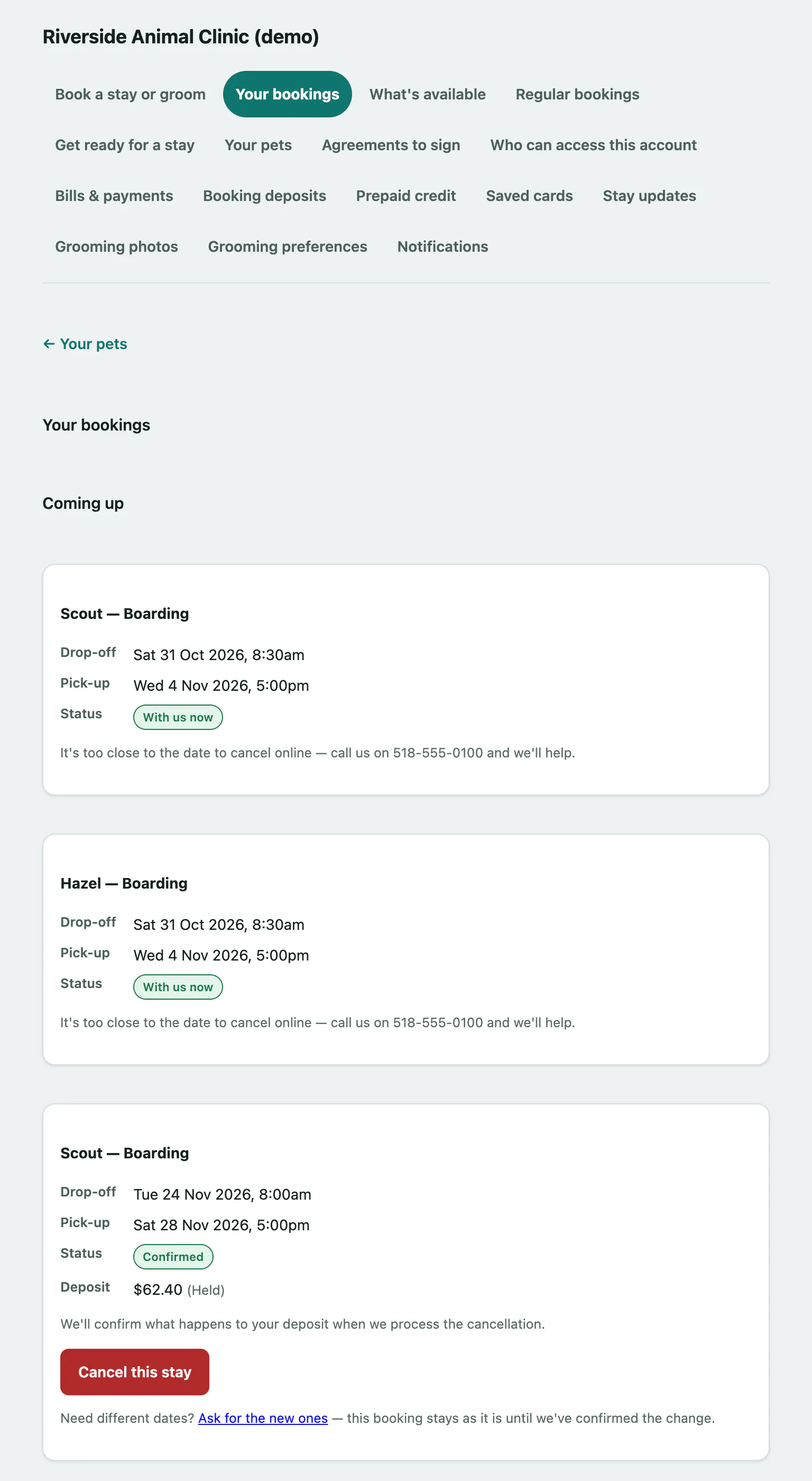
- Coming up shows each confirmed stay and groom, with the drop-off and pick-up times and any deposit. A pet that's with the facility right now shows With us now. A groom booked during a stay shows During a stay.
- Requests shows each request you've sent and where it's up to.
If you see You've got a request you haven't sent yet., you started a request and didn't send it. Select Finish it off to go back to it.
Request statuses
| Status | What it means |
|---|---|
| With us | The facility has your request and hasn't looked at it yet. |
| We're looking at it | Someone is reviewing it. |
| Confirmed | It's booked. It now also appears under Coming up. |
| Partly confirmed | Some items are booked and some aren't. Each item shows its own status. |
| We couldn't do it | The facility couldn't take it. Any note from them is shown on the request. |
Each item in a request has its own label too: Asked for, Confirmed, Not available, On the waitlist or Withdrawn.
Cancel a stay or a groom
If your facility lets you cancel online, a cancel button appears on bookings that are far enough away.
- Under Coming up, select Cancel this stay for a stay, or Cancel this appointment for a groom on the booking.
If the booking has a deposit, the line above the button says what happens to it when you cancel. If it's too close to the date, you'll see It's too close to the date to cancel online. Call the facility instead.
Withdraw a request
You can withdraw a request while it's still With us or We're looking at it.
- Under Requests, select Withdraw this request on the request.
Change the dates
For a booking the facility made for you, select Ask for the new ones (or Ask for the new one for a groom), if it's shown, and send a new request with the dates you want (see Book a stay or a groom). Your existing booking stays as it is until the facility confirms the change.
Bookings you made online
A stay you booked yourself online shows You booked this one online. You can move or cancel these yourself.
- Select Move or cancel it here. Bookings you made online opens.
- Enter the new dates in New drop-off and New pick-up. For a grooming booking there's only New start time.
- Select Move this booking.
Moving a booking changes the dates for every pet on it. To change who's coming, cancel and book again. To cancel, select Cancel this booking and confirm.
If the booking is too close, you'll see Too close now to change online, along with how many hours' notice the facility needs. Call them instead.
If the move is refused because something is missing for a pet, such as a vaccination, the message lists what's needed. You can send the record from Send a vaccination record.