
Boarding
Record belongings and incidents
On this page
Every stay has a Belongings & incidents page. Log what the owner left with the pet at drop-off, mark it returned at pick-up, and file a report when something happens during the stay.
To open it, select Incidents & belongings at the top of the stay's page (see Check a guest in and out). The page header shows the pet, the owner and the stay's status.
Log belongings at drop-off
- Under Log a belonging, enter the Item description, such as "Orthopedic dog bed".
- Change the Quantity if there's more than one, and add any Condition / notes.
- Select Log belonging.
Repeat for each item. You can log belongings while offline; they're sent when you're back online.

Hand belongings back
The usual way is the take-home checklist when you check the pet out (see Check a guest in and out › Check out). To reconcile one item on its own:
- In Belongings dropped off, select Mark returned on that item.
The table then shows when it was returned and who handed it back.
File an incident report
Use this for anything worth a record: behaviour, a health concern, an injury, a scuffle, an escape attempt or soiling.
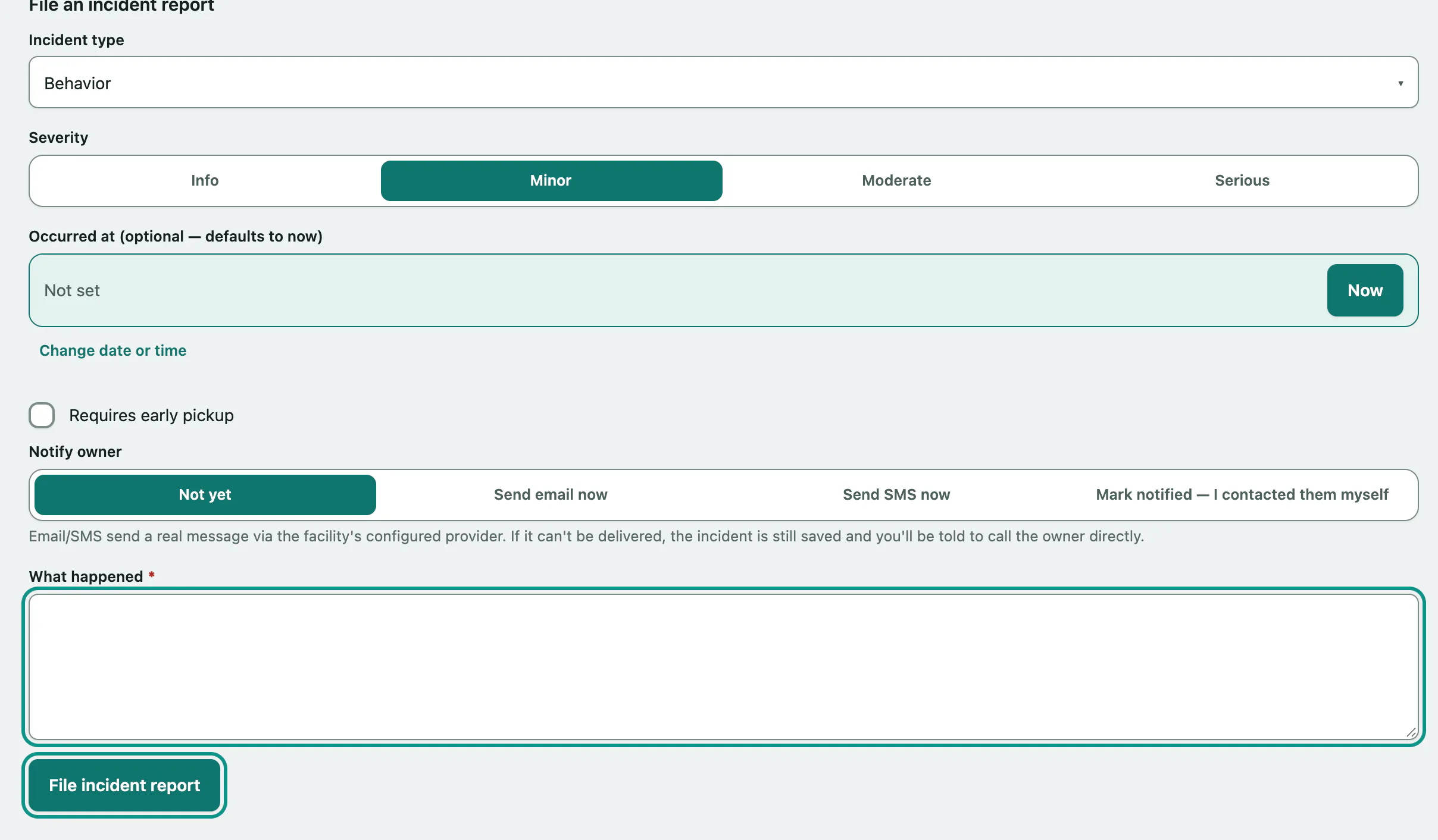
- Under File an incident report, choose the Incident type.
- Choose the Severity: Info, Minor, Moderate or Serious.
- Enter Occurred at (optional — defaults to now) if it happened earlier.
- Tick Requires early pickup if the pet can't finish its stay.
- Choose how to Notify owner (see below).
- Describe What happened.
- Select File incident report.
Telling the owner
| Option | What happens |
|---|---|
| Not yet | The report is saved and the owner isn't contacted. You can notify them later. |
| Send email now | Sends the owner a real email through your facility's email provider. |
| Send SMS now | Sends the owner a real text message. |
| Mark notified — I contacted them myself | Records that you've already spoken to them. |
The form warns you if the owner has no email or no phone number on file.
To notify the owner about a report you've already filed:
- In Incident reports, choose Email, SMS or Mark manually on that report.
- Select Notify.
Once the owner is notified, the report shows when and how, and the control reads done.
Earlier incidents
This pet's incidents from other stays lists the pet's incidents from its other visits, newest first, with a link to each stay. Serious incidents and early pick-ups also show up as a warning the next time someone books the pet (see Book a boarding stay › Behavioral history) or assigns it a kennel.
Who can do what
Anyone signed in can view this page. Logging and returning belongings needs permission to manage reservations. Filing a report or notifying the owner needs permission to report incidents, which front desk, veterinarians and practice managers have by default. A pet's death during a stay is never filed here; see Record a death in care.