
Hospital
End a hospital stay
On this page
Every hospital stay ends one of three ways: the patient goes home (discharge), moves to another facility (transfer), or dies. The End Stay screen handles all three, and is also where you write the home-care instructions and tell the owner their pet is ready to collect.
Only staff with admitting authority can change anything here. Veterinarians and practice managers can; others see the stay read-only.
Open the stay
- On the ward board, find the patient's card and select End stay.
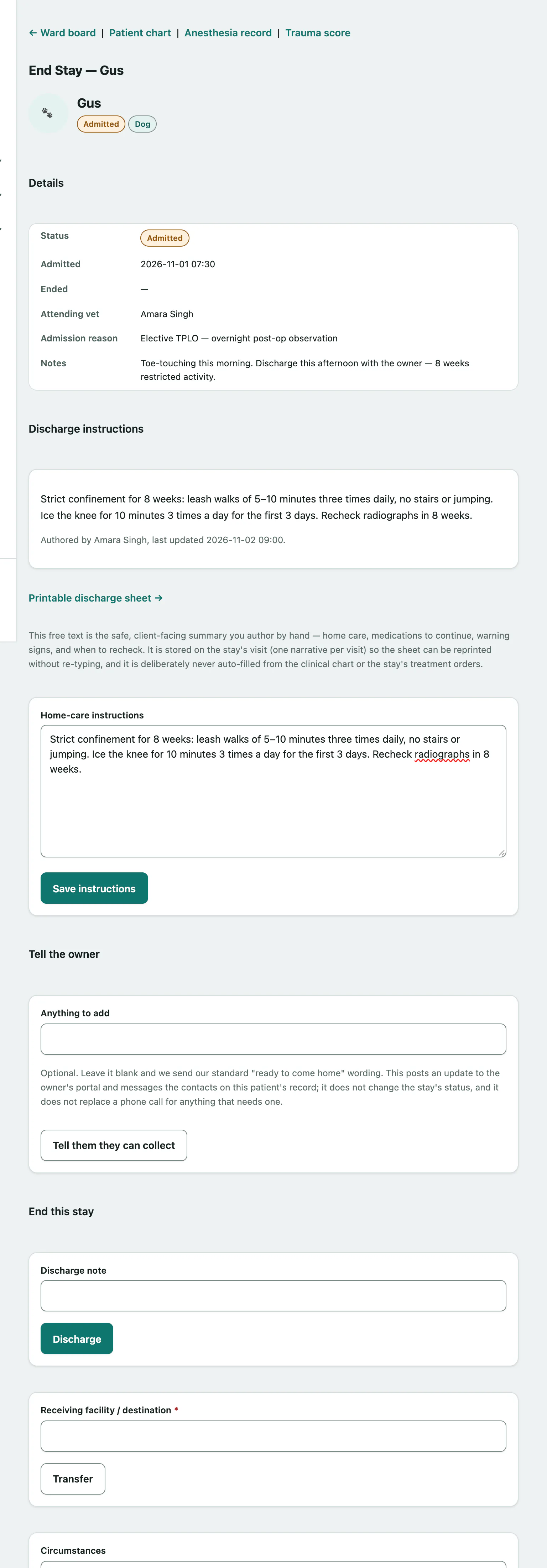
The screen shows the stay's Details: status, when the patient was admitted, the attending vet, the admission reason and notes. Links at the top go to the Anesthesia record and Trauma score for the stay.
Write the home-care instructions
Write these before the patient leaves. They're the client-facing summary: home care, medications to continue, warning signs and when to come back for a recheck. Nothing is filled in automatically from the chart or the treatment orders; you write it yourself.
- Under Discharge instructions, type in Home-care instructions.
- Select Save instructions.
You can keep editing them, even after the stay has ended. Once saved, a Printable discharge sheet → link appears if your practice also uses the Vet Practice module.
Tell the owner they can collect
While the patient is still admitted, you can let the family know they can come and pick their pet up. This doesn't change the stay's status.
- Under Tell the owner, optionally type a message in Anything to add. Leave it blank to send the standard "ready to come home" wording.
- Select Tell them they can collect.
This posts an update to the owner's portal and messages the contacts on the patient's record. The confirmation tells you how many contacts were messaged. If nobody could be messaged automatically, it says so; call them instead. If the client portal is switched off, you'll be asked to phone the owner.
End the stay
Under End this stay, use one of the three forms.
To send the patient home:
- Optionally enter a Discharge note.
- Select Discharge.
To transfer the patient to another facility:
- Enter the Receiving facility / destination. It's required.
- Select Transfer.
When a stay is discharged or transferred, its active treatment orders are discontinued and any doses still pending are marked skipped. The owner's portal shows that the patient has been discharged or transferred.
To record that the patient died:
- Optionally describe the Circumstances.
- Select Mark deceased & open death record.
This ends the stay, marks the patient deceased on their record, and takes you straight to the death record to complete it (see Record a death in hospital). Nothing is posted to the owner's portal. The family should hear this from a person, by phone.