
Equine
Record movement and identity documents
On this page
Movement and identity documents are the papers horses need outside the US and Canada: a UK or Ireland horse passport, an Australian Hendra declaration, an export health certificate or an equine piroplasmosis test. Vivetra keeps a record of them and prints it; it doesn't register or file anything with an issuing body.
A Coggins test, including one done for an export, goes on the Coggins screen instead (see Record a Coggins test).
Record a document
Recording a document needs the clinical-authorship permission, which vets have by default.
- On the horse's record, select Movement documents (see Work with a horse's record).
- Under Record a movement / identity document, choose the Document type.
- Enter the Document number: the passport, certificate or accession number, if there is one.
- For a piroplasmosis test, choose the Result. Leave it blank for a passport, declaration or certificate.
- Enter the Issued date and, where there is one, the Expires on date. A passport doesn't expire, so leave it blank.
- Select Record document. You'll see Movement document recorded.
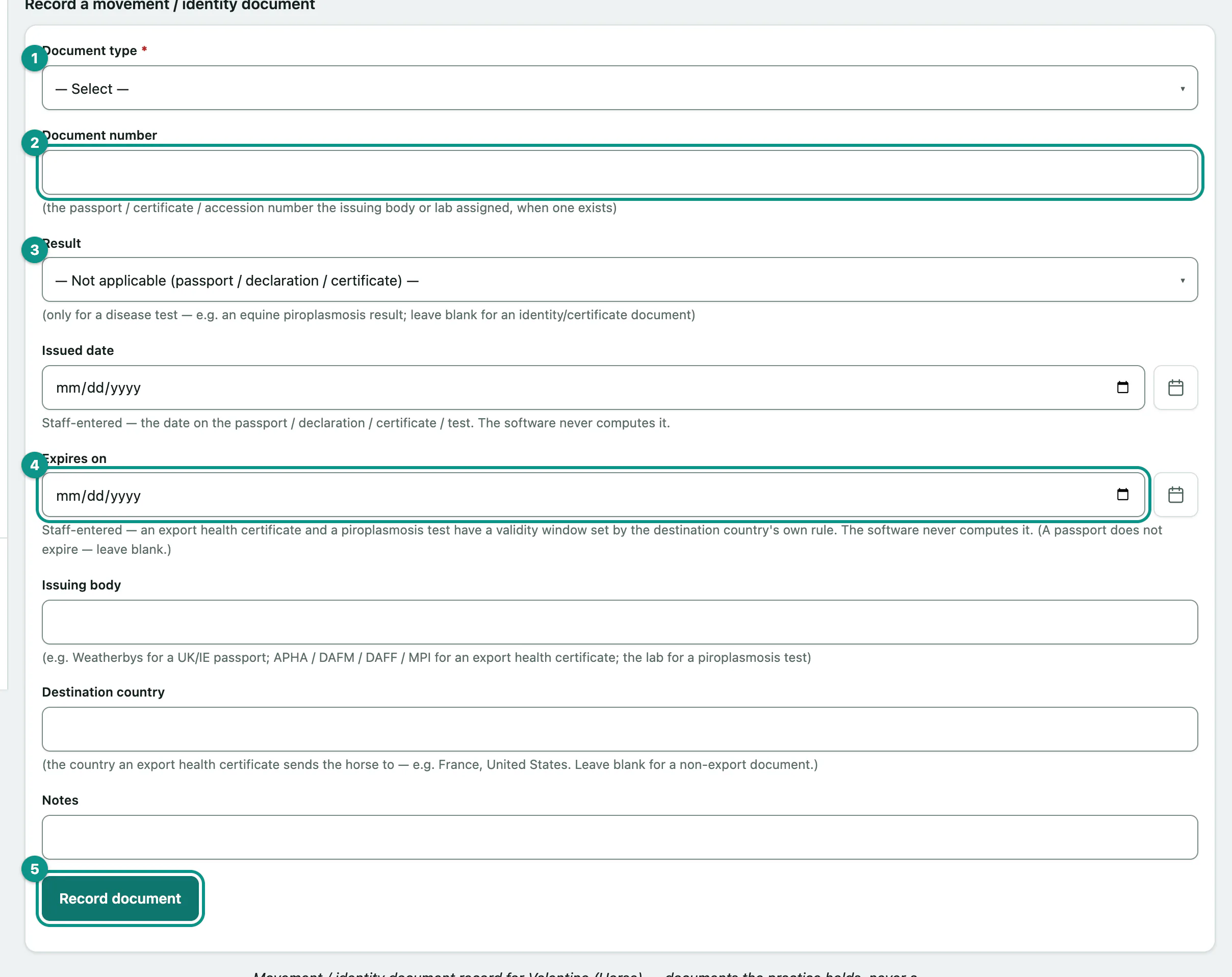
Also record the Issuing body, such as Weatherbys for a passport or the lab for a test, and the Destination country for an export certificate. As with Coggins tests, you enter the expiry date yourself; Vivetra never calculates it.
See and print the history
Document history lists every document recorded for the horse. Select Print document record to print it.