
Client portal · Equine
See your horses and who owns them
In Vivetra: Your horses
Your horses is the home page of your practice's equine portal. It lists every horse on your account, where the practice has each one recorded as standing, and who holds a share in it.
Open your horses
Sign in to the portal (see Sign in to the client portal), then:
- Select Your horses in the portal menu.
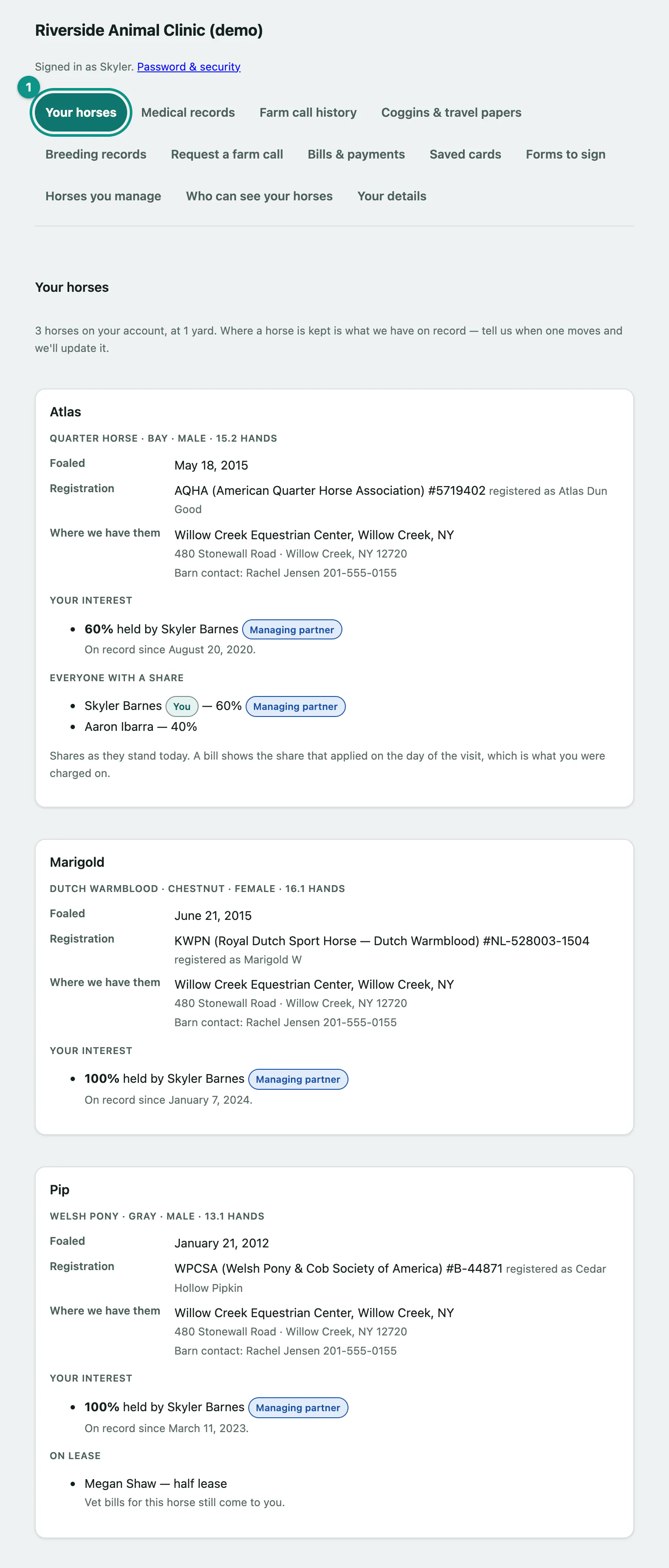
The line at the top counts your horses and how many different yards they're at.
What each horse card shows
- The horse's details: breed, colour, sex and height, then Foaled and any Registration numbers. A horse registered with more than one registry shows each, with the main one marked Primary.
- Where we have them: the yard and address the practice has on file, and the barn contact if there is one.
- Your interest: the share you hold (for example 60% held by you), when it was recorded, and Managing partner if that's you. If the horse is billed through a partnership, it says Billed through and the partnership's name.
- Everyone with a share: shown when more than one person owns the horse. Your own line is marked You.
- On lease: who leases the horse and the kind of lease, and whether vet bills go to the lessee or still come to you.
If something looks wrong
Ownership shares, leases and yards are all recorded by the practice. You can't change them in the portal. Call the practice if anything is wrong, especially shares, because they decide what you're billed. Tell them when a horse moves yards too.
If you look after other people's horses rather than owning any, this page points you to Horses you manage instead (see Share your horses with a barn manager › Horses you manage).
Everything else
The Everything else card at the bottom links to your horses' records, Coggins and travel papers, farm call history, bills, and Who can see your horses.