
Hospital
Manage the blood bank
In Vivetra: Hospital › Blood Bank
The Blood Bank keeps your blood donor programme and a record of every bag of blood product you hold: whole blood, packed red cells, plasma and so on. Each unit is one physical bag with its own identifier and status.
It isn't a stock-control system. There are no stock counts, on-hand totals or reorder alerts. Crossmatches, transfusions and reactions are recorded on the patient's transfusion record (see Record a transfusion).
Anyone can view the blood bank. Enrolling donors and recording units needs flowsheet charting access, which veterinarians have.
Open the blood bank
- Select Blood Bank in the Hospital menu.
The screen has two parts: the Donor registry and Blood units. Filter donors by Donor status with Filter donors. Filter units by Unit status, or search by Identifier, source or storage location, then select Filter units.
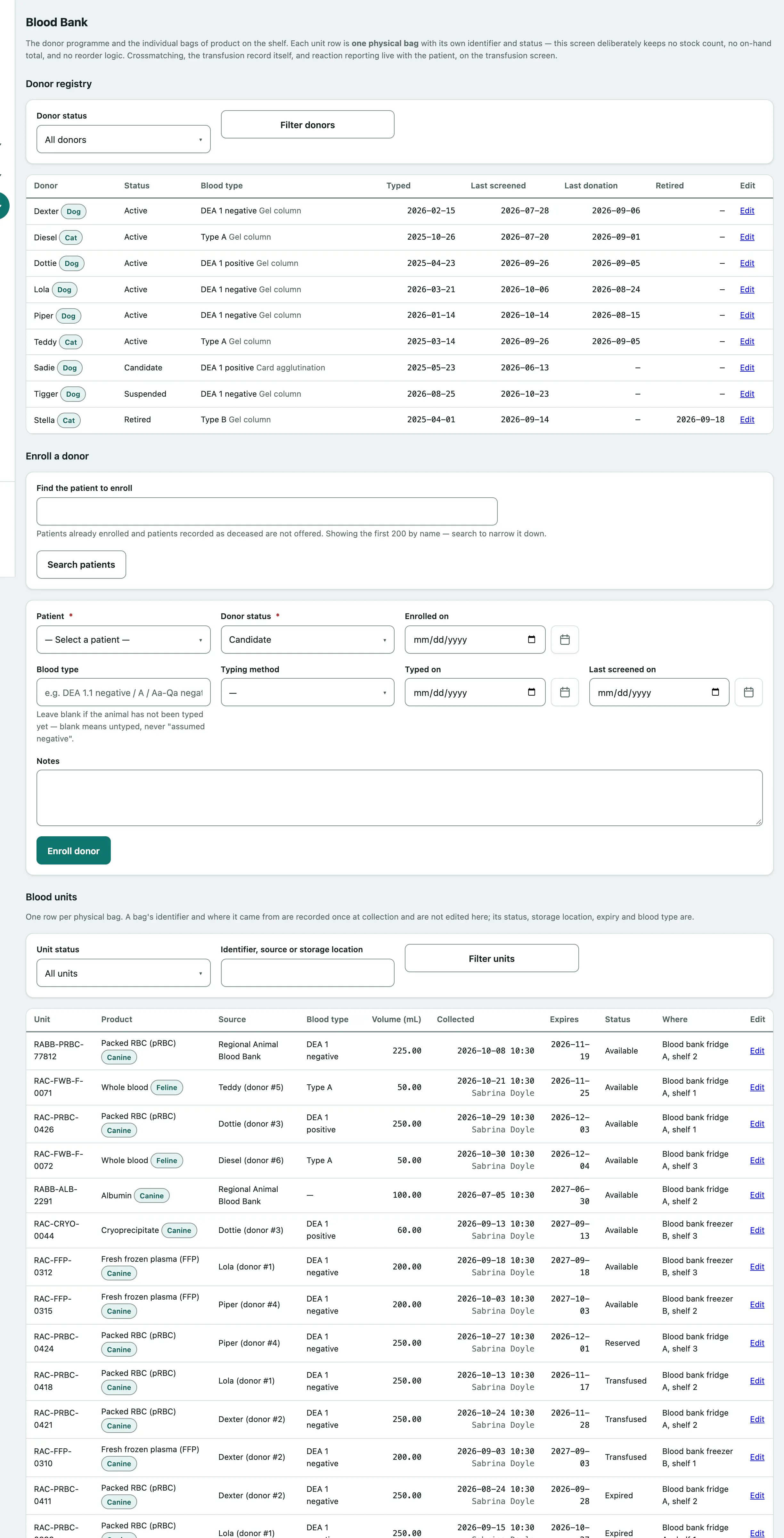
A unit past the expiry date on its label is marked Past expiry. Its status isn't changed automatically; update it when you deal with the bag.
Enroll a donor
Donors are patients. To enroll one:
- Under Enroll a donor, type in Find the patient to enroll and select Search patients.
- Choose the Patient.
- Choose the Donor status: Candidate, Active, Suspended or Retired.
- Enter the Blood type if the animal has been typed, with the Typing method and Typed on date.
- Select Enroll donor.
Patients already enrolled, and patients recorded as deceased, aren't offered. Leave Blood type blank if the animal hasn't been typed. Blank means untyped, never "assumed negative". Blood type is free text because canine, feline and equine typing systems differ.
Update a donor
Select Edit next to a donor to update their status, blood type, Last screened on, Last donation on, and screening and eligibility notes.
- Select Edit next to the donor and make your changes.
- Select Save donor.
To retire a donor, set the status to retired and fill in Retired on and Retirement reason. The record is kept so the units collected from them keep their history.
Record a unit
- Under Record a unit, enter the Unit identifier written on the bag. It must be unique.
- Choose the Product, such as Packed RBC (pRBC) or Fresh frozen plasma (FFP).
- Choose the Status, usually Available.
- Choose who it was Collected from (your donor), or enter an …or external source such as a commercial blood bank. Use one or the other, not both.
- Set Expires on.
- Select Record unit.
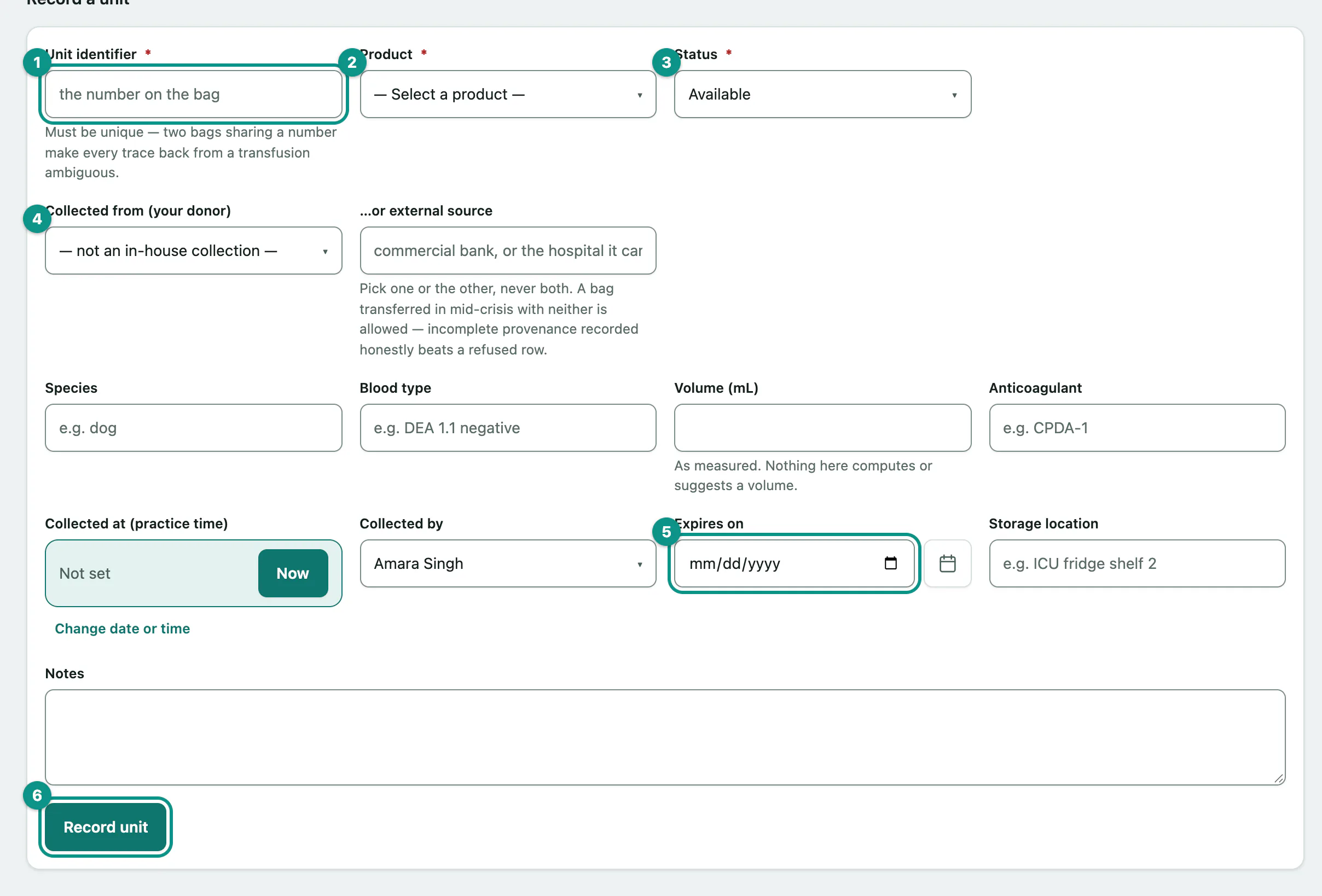
You can also record the species, blood type, Volume (mL) as measured, Anticoagulant, Collected at (practice time), Collected by and Storage location. If a bag arrives in a hurry with no source details, you can still record it and fill them in later.
Update a unit's status
Unit statuses are Available, Reserved, Issued, Transfused, Expired and Discarded. When a transfusion linked to a unit is charted, the unit moves to issued or transfused automatically.
- Select Edit next to the unit.
- Choose the new Status.
- If you're discarding the bag, say what happened in Disposition note. It's required for a discarded unit.
- Select Save unit.