
Equine
Put a horse on a quarantine hold
On this page
A quarantine hold records that a horse is isolated, for example after a positive Coggins, an exposure or an import, and who you reported it to. Vivetra records the hold; it never files the report with the authorities for you.
Starting and releasing holds needs the quarantine-management permission, which vets and practice managers have by default. Everyone else can see the history.
Start a hold
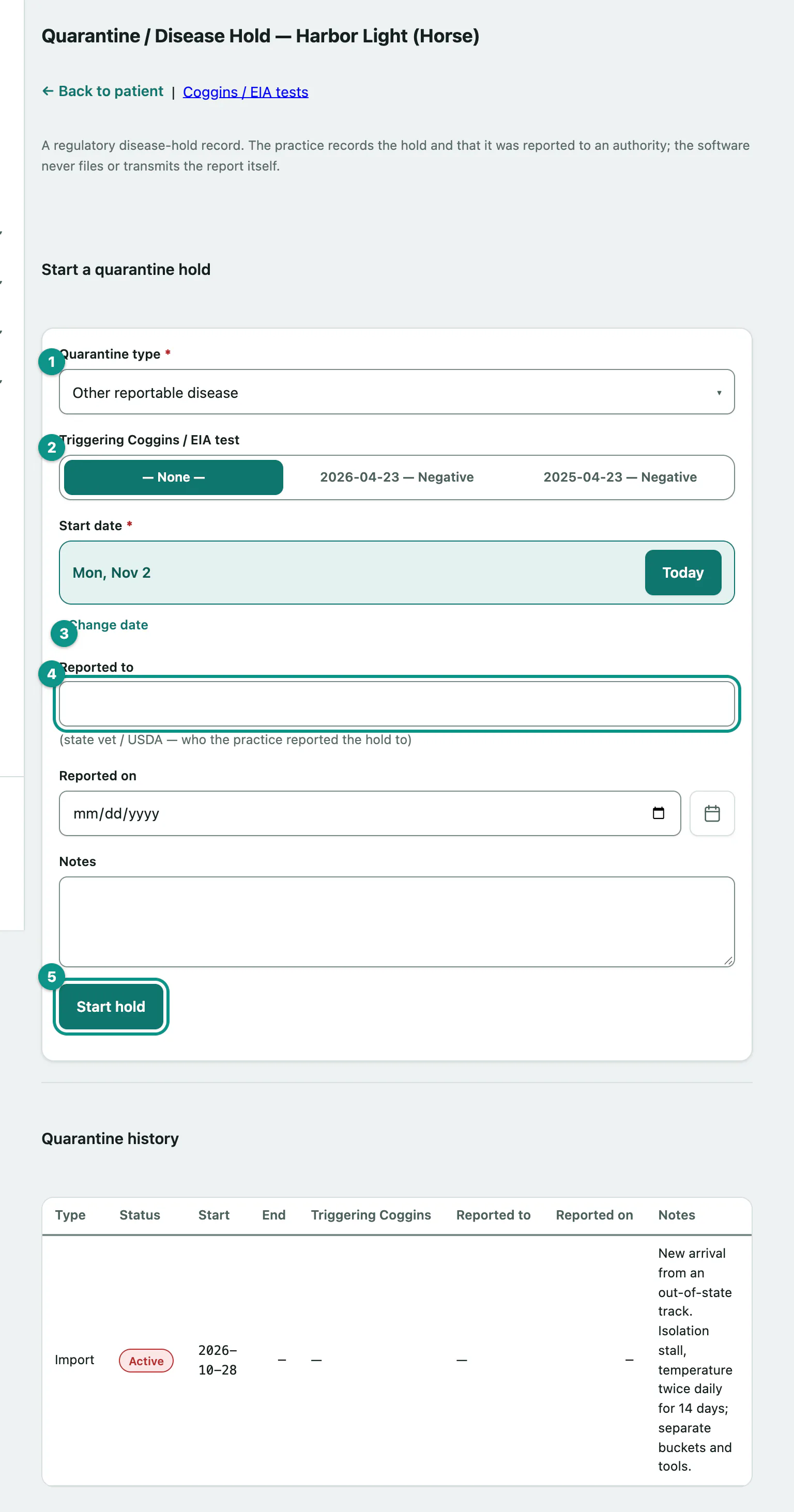
- On the horse's record, select Quarantine (see Work with a horse's record).
- Under Start a quarantine hold, choose the Quarantine type: EIA positive, EIA exposure, Import, Other reportable disease or Other.
- If a Coggins result triggered it, choose it in Triggering Coggins / EIA test (see Record a Coggins test).
- Set the Start date. It starts as today.
- Enter who you reported it to in Reported to, such as the state vet or USDA, and the Reported on date.
- Select Start hold. You'll see Quarantine hold started.
Put any isolation instructions in Notes before you start it.
Active holds also appear on the Active quarantine holds dashboard card.
Release a hold
Quarantine history lists every hold with its status: Active, Released or Lifted.
- On the active hold's row, choose Released or Lifted, and check the end date next to it. It starts as today.
- Select Release. You'll see Quarantine hold released.
A released hold stays in the history with its end date.