
Hospital
Use the ward board
In Vivetra: Hospital › Ward Board
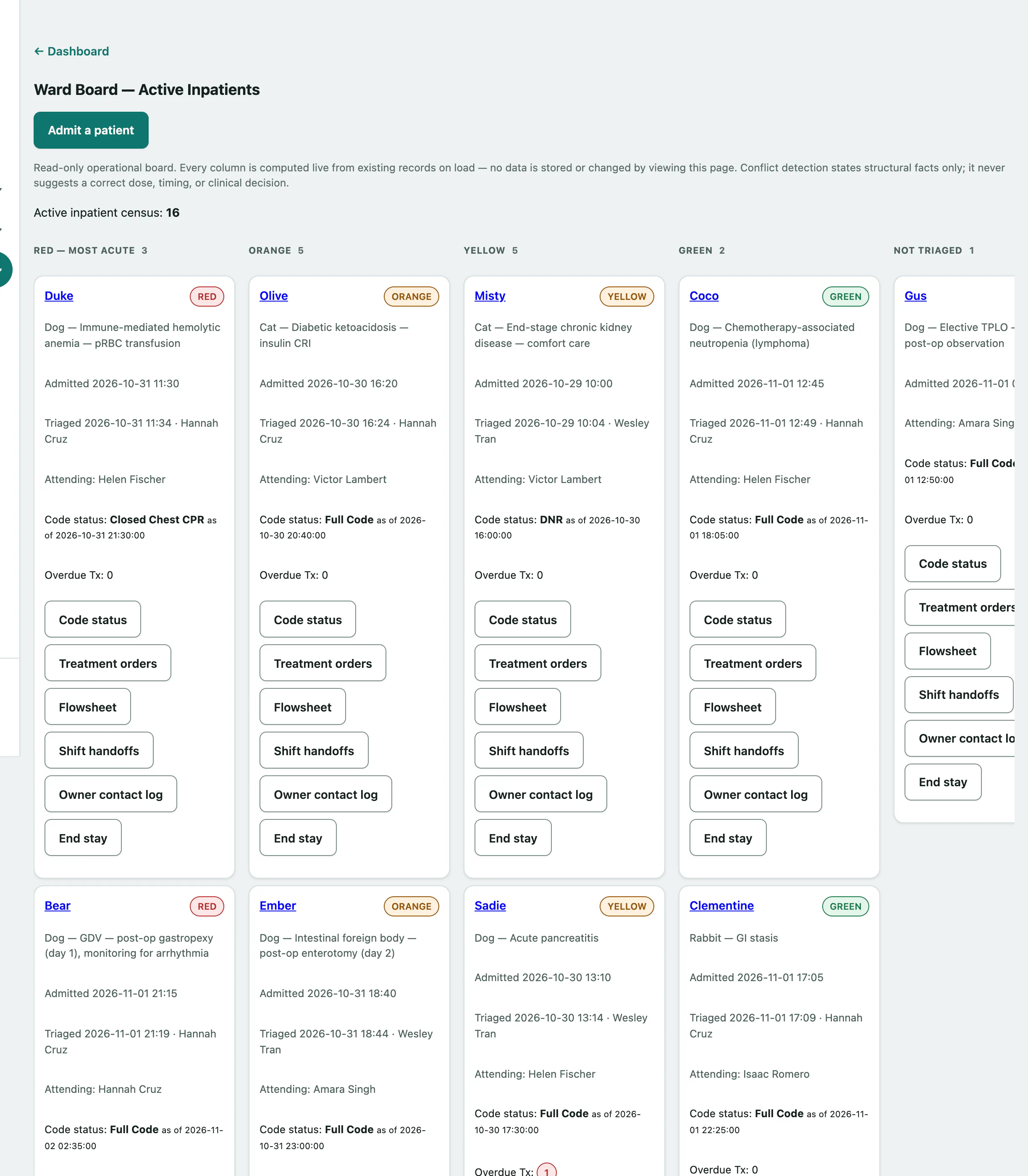
The ward board shows every patient currently admitted to the hospital on one screen, grouped by triage level. Use it at the start of a shift, on a wall monitor, or whenever you need to see who is in and what needs attention.
Open the ward board
- Select Ward Board in the Hospital menu.
The board updates itself every few seconds, so you don't need to reload it.
Read the board
The top of the board shows the Active inpatient census: how many patients are admitted right now. Below that, patients sit in five lanes, from most to least urgent: Red — most acute, Orange, Yellow, Green and Not triaged. Each lane shows a count. An empty lane says None.
Within a lane, the patient who has been in longest comes first. Each patient's card shows:
| On the card | What it tells you |
|---|---|
| Patient name | Select it to open the patient's chart. |
| Triage pill | The triage level, or not triaged. |
| Species and reason | Why the patient was admitted. |
| Admitted / Triaged | When, in your practice's time, and who triaged. |
| Attending: | The vet in charge of the stay. |
| Code status: | The resuscitation directive in force, or none recorded. |
| Overdue Tx: | Treatments that were missed or are past due. A red number means something needs doing. |
| Structural conflicts (facts only): | Shown only when there's a clash, such as two active orders for the same drug whose times overlap, or two treatments booked for the same slot. |
Act on a patient
Each card has buttons that take you straight to that patient's stay:
- Code status: record or change the resuscitation directive (see Record a patient's code status).
- Treatment orders: see and write the stay's orders (see Write treatment orders).
- Flowsheet: the stay's treatment flowsheet, where doses are checked off.
- Shift handoffs: handoff notes for the visit, when the stay has one.
- Owner contact log: record calls with the owner (see Log contact with the owner during a stay).
- End stay: discharge, transfer or record a death (see End a hospital stay).
For example, to deal with an overdue treatment:
- Find the patient's card on the Ward Board.
- Check the Overdue Tx: count on the card.
- Select Treatment orders to review the stay's orders, then open its Flowsheet to check off the dose.
Admit someone new
- Select Admit a patient under the board's title. See Admit a patient.