
Client portal · Vet Practice
Wellness plans
In Vivetra: Wellness plans
Wellness plans shows the plans your pets are on and how much of each plan's benefits is left. If your practice offers it, you can also ask to join a plan here.
See your plans
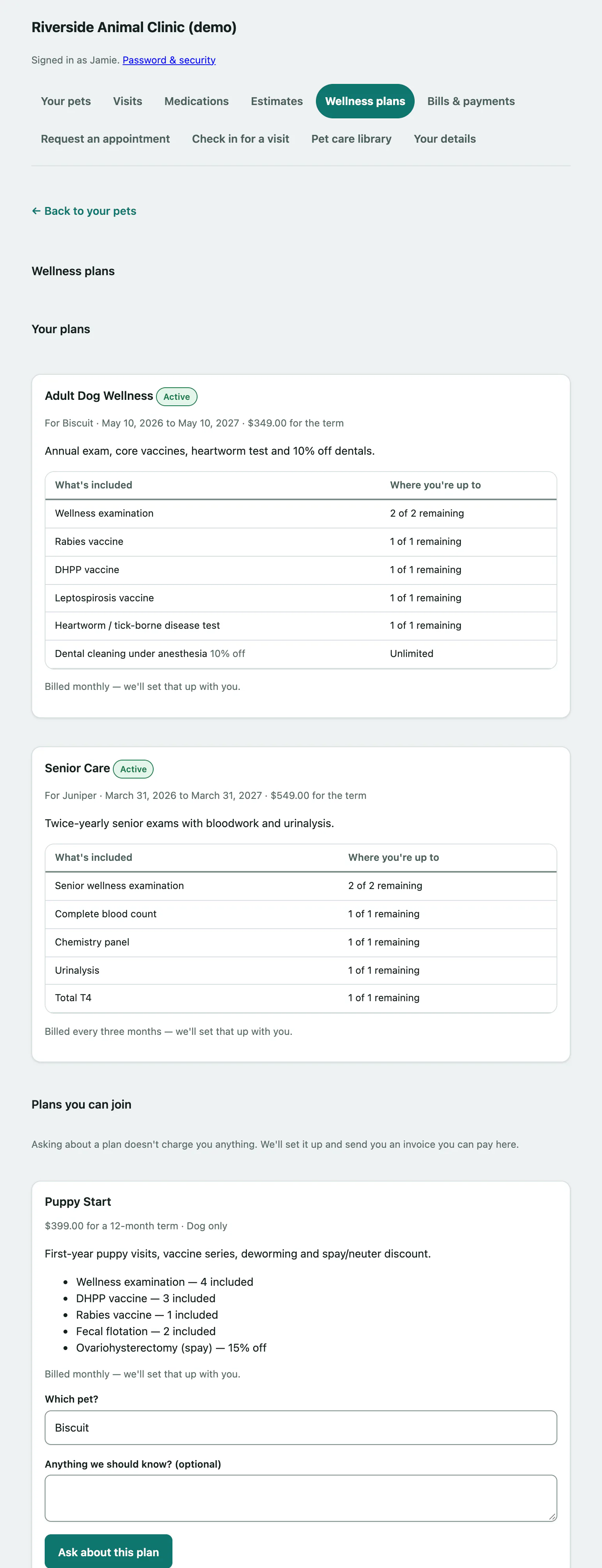
Select Wellness plans in the portal menu. Under Your plans, each plan shows which pet it's for, the dates of the term and the price for the term. An Active plan is one that's running today.
The table lists What's included and Where you're up to: how many of each benefit you have left, for example "1 of 2 remaining", or Unlimited. Discounts show the percentage off.
Ask to join a plan
Under Plans you can join, each plan shows its price, term length, what's included and how it's billed. A plan for one species only says so, and only pets of that species can be picked for it.
- Find the plan you want and choose your pet in Which pet?.
- If you like, add a note in Anything we should know? (optional).
- Select Ask about this plan.
You'll see Thanks — we've got your plan request. This is a request, not a sign-up, so nothing is charged yet. The practice sets the plan up and sends you an invoice you can pay in the portal (see Pay a bill).
Follow or withdraw a request
Your requests are listed under Your plan requests with their status:
| Status | What it means |
|---|---|
| Pending | The practice has your request and is looking at it. |
| Approved | You're set up on the plan. If there's a bill, a link takes you to it. |
| Declined | The practice couldn't set this one up. Give them a call and they'll explain. |
Changed your mind? While a request you made is still pending, select Withdraw this request. You'll see That plan request has been withdrawn.
If someone else on your pet's record made the request, you can see it but only they can withdraw it.