
Boarding
Log daily care during a stay
On this page
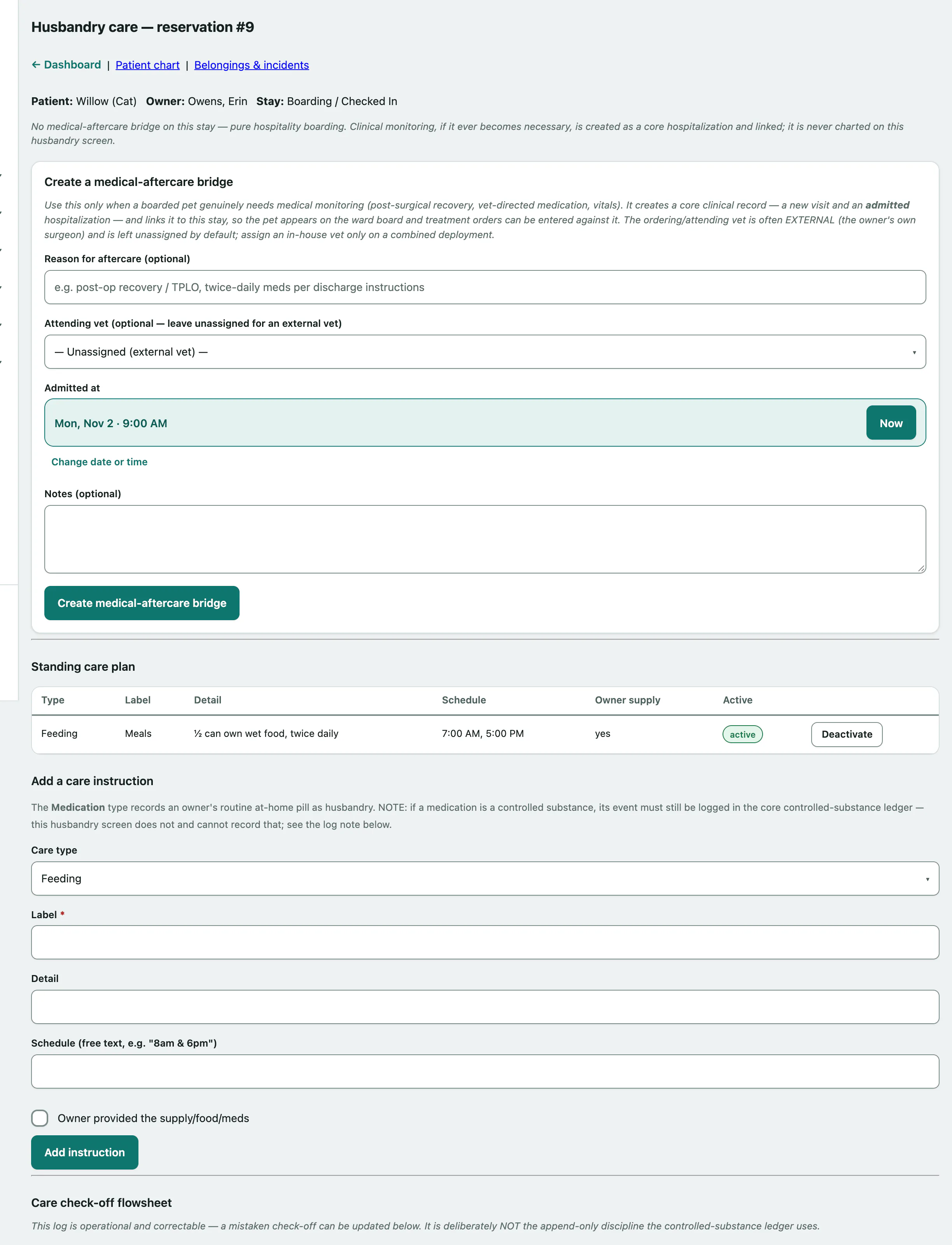
The Husbandry care screen for a stay holds the owner's care plan (feeding, medication, walks, play) and a check-off log of what was actually done. If a boarded pet needs real medical monitoring, it's also where you link the stay to a clinical record.
Open it from the reservation: in the Medical aftercare row, select care screen or create a medical-aftercare bridge. See Check a guest in and out for finding a reservation.
Who can do what
| Task | Needs |
|---|---|
| Add or deactivate care-plan instructions | Reservation management (front desk, veterinarian, practice manager) |
| Log or correct a care event | Care logging (veterinarian, practice manager) |
| Create a medical-aftercare bridge | Reservation management |
| Transcribe a standing order | Both flowsheet logging and reservation management (veterinarian, practice manager) |
Without the permission, you see that section read-only.
Add to the standing care plan
The Standing care plan is what the owner asked for: one line per routine, such as "Breakfast" or "Thyroid pill".
- Under Add a care instruction, choose the Care type: Feeding, Medication, Walk, Play or Other.
- Enter a Label. Detail and Schedule (free text, e.g. "8am & 6pm") are optional.
- Select Add instruction.
Tick Owner provided the supply/food/meds when the owner brought it in. To stop an instruction, select Deactivate on its row.
Log a care event
The Care check-off flowsheet records each feeding, dose, walk or potty break as it happens, with who did it and when.
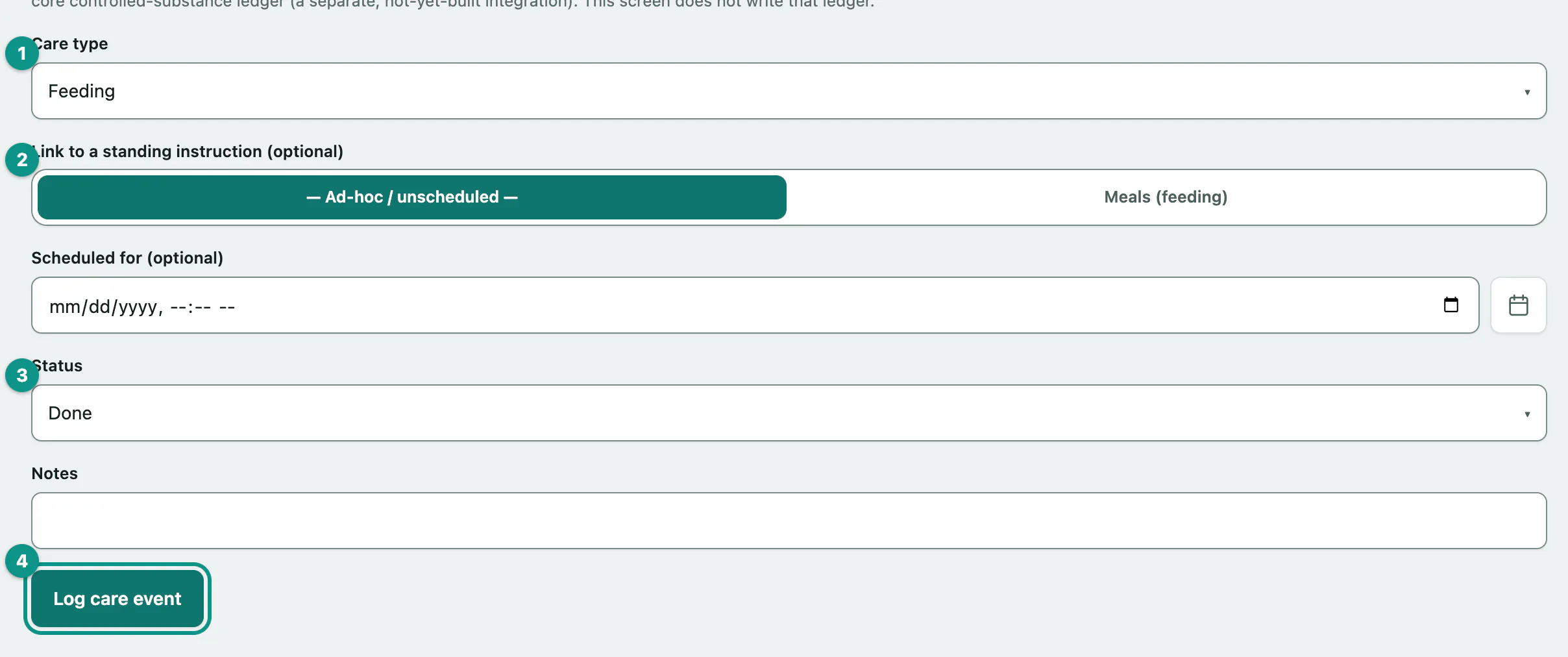
- Under Log a care event, choose the Care type. Potty is available here too.
- Choose which instruction it belongs to under Link to a standing instruction (optional), or leave it as — Ad-hoc / unscheduled —.
- Choose the Status: Pending, Done, Skipped, Refused or Missed. It starts on Done.
- Select Log care event.
Scheduled for (optional) and Notes are optional. If the connection drops, the care forms on this screen queue and send when you're back online.
To fix a mistake, change the status or notes on that row and select Update. This log is meant to be correctable.
When a boarded pet needs medical care
Most stays are hospitality only. When a pet genuinely needs medical monitoring, such as post-surgical recovery or vet-directed medication, create a medical-aftercare bridge. It creates a new visit and an admitted hospitalization, links it to the stay, and puts the pet on the clinical treatment flowsheet.
- Under Create a medical-aftercare bridge, enter the Reason for aftercare (optional).
- Choose the Attending vet (optional — leave unassigned for an external vet). The overseeing vet is often the owner's own surgeon, so it starts as — Unassigned (external vet) —.
- Check Admitted at and add any Notes (optional).
- Select Create medical-aftercare bridge.
You can only do this on an open stay. Once a stay has a bridge, the care screen links to the clinical treatment flowsheet and to the external standing orders.
Transcribe an outside vet's standing order
External standing orders is where you copy in the overseeing vet's written instructions, word for word. It's only available once the stay has a medical-aftercare bridge and the pet is admitted. Nothing here is a prescribing decision.
- On the care screen, select External standing orders (transcribe the overseeing vet's written instructions).
- Choose the Order type.
- Enter the Order as written, copied from the vet's own words.
- Enter the Ordering source: who ordered it and from what document or call.
- Optionally enter a Dosing interval — hours (optional), with Starts at and Ends at.
- Select Record standing order.
If you set an interval, the whole check-off schedule is created straight away, one row every that-many hours across the window. Leave it blank for an as-needed order. Instructions (optional) and Frequency label (optional) are for the chart. Doses are checked off on the clinical treatment flowsheet, not on this screen. Attach the scanned instructions to the reservation so the paper trail is complete.