
Hospital
Set up departments
In Vivetra: Hospital › Departments
Departments are your hospital's own list of services, such as Emergency & Critical Care, Cardiology, Internal Medicine or Surgery. Referrals are routed to a department from this list, and estimate and invoice lines can be tagged with one, so set it up before you start taking referrals.
Only staff who can manage staff see Departments. By default that's the practice manager.
Open departments
- Select Departments in the Hospital menu.
The Department roster lists every department with its name, code, whether it's an emergency-intake department and whether it's active.
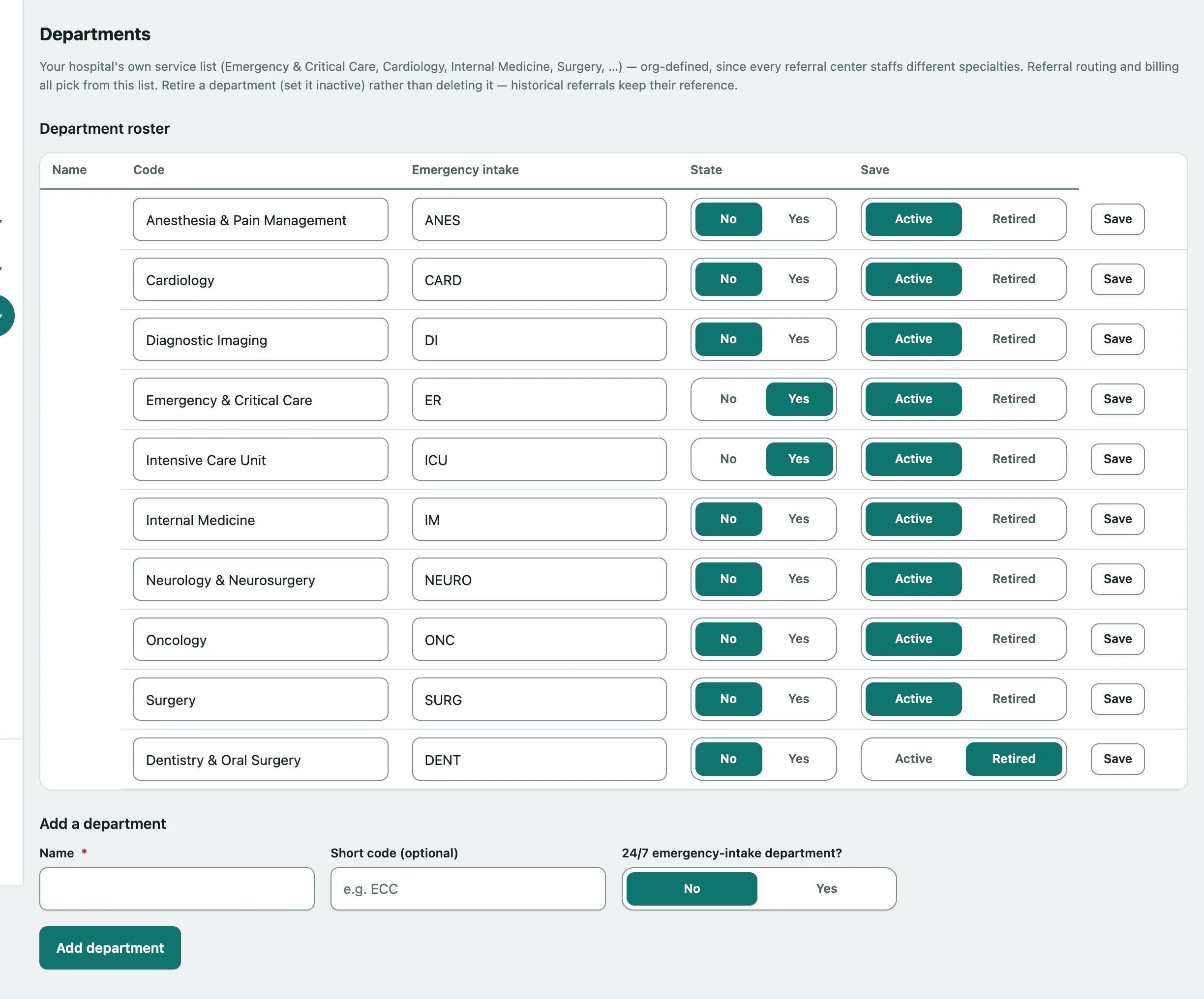
Add a department
- Under Add a department, enter the Name, for example "Emergency & Critical Care".
- Optionally enter a Short code (optional), such as ECC.
- Set 24/7 emergency-intake department? to Yes for your emergency service.
- Select Add department.
Change or retire a department
Each row in the roster is editable. Change the name, code or Emergency intake setting in place, then select that row's Save.
To stop using a department:
- In its row, set State to Retired.
- Select Save in the same row.