
Records & admin · Records
Log a controlled drug event
In Vivetra: Records › Dispensing Log
On this page
Every movement of a controlled drug goes in the Dispensing Log: stock received, doses given or sent home, waste, adjustments and anything lost or stolen. The log is append-only. Nothing in it can be edited or deleted; mistakes are fixed with a correcting entry.
Viewing the log needs controlled-log view permission (veterinarians and practice managers). Recording events needs controlled-log permission, which veterinarians have. Everyone else sees the log read-only.
Record an event
The drug has to be on your Set up the controlled drug list first.
- Select Records › Dispensing Log in the menu.
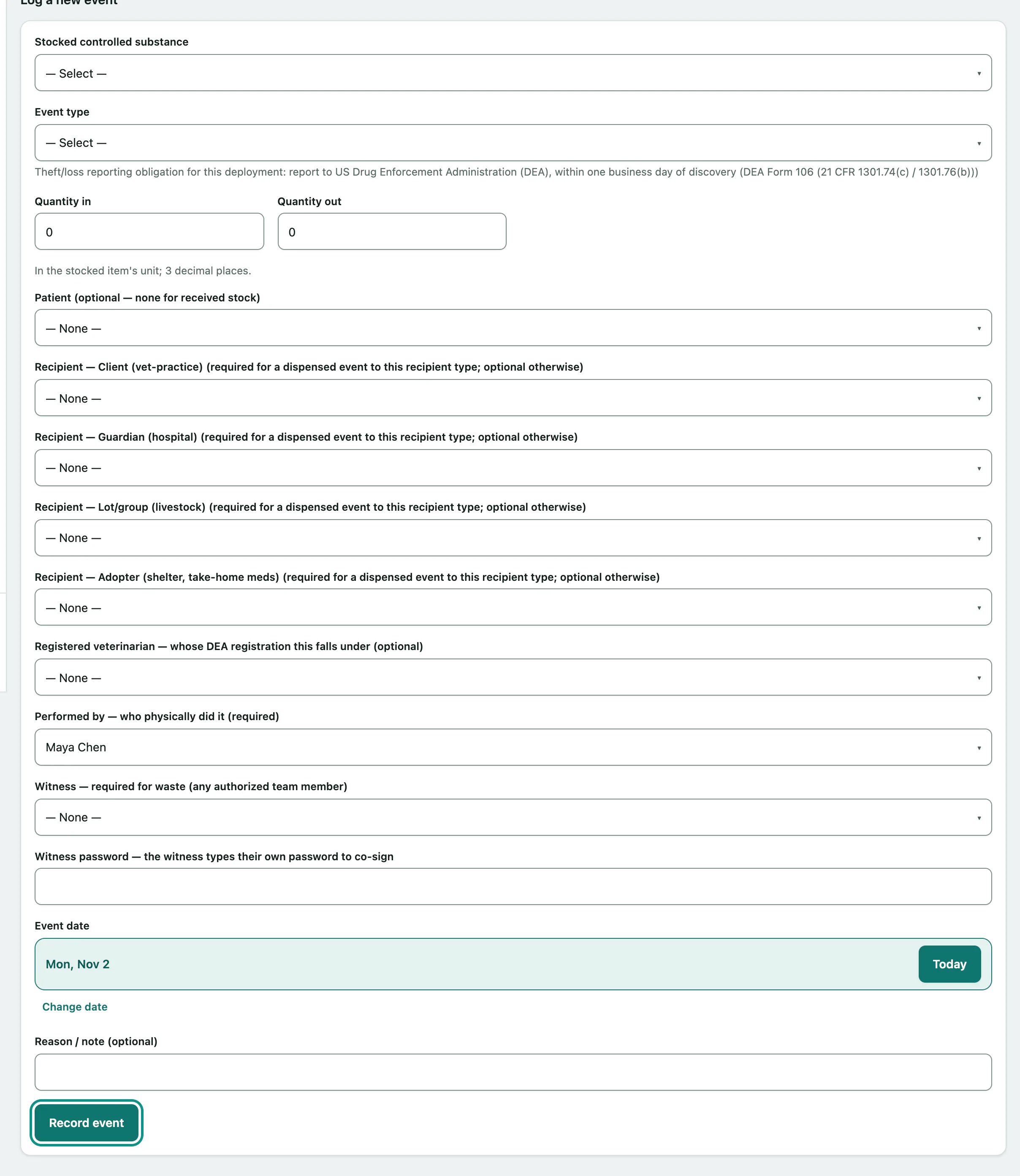
- Under Log a new event, choose the Stocked controlled substance.
- Choose the Event type.
- Enter the amount in Quantity in or Quantity out, in the drug's own unit.
- Choose the Patient (optional — none for received stock) if the drug went to a patient, and the registered veterinarian whose registration it falls under.
- Choose who physically did it in Performed by — who physically did it (required).
- For waste, choose a Witness — required for waste (any authorized team member) and have them type their own password in Witness password — the witness types their own password to co-sign.
- Check the Event date and add a reason or note.
- Select Record event.
| Event type | Use it for |
|---|---|
| Received (stock in) | A delivery. Use Quantity in. |
| Administered | A dose given in the clinic. |
| Dispensed | Drug sent home or to another recipient. |
| Wasted (witness required) | Drawn up but not used. A witness must co-sign. |
| Adjustment | A balance correction you can explain, for example after a count. |
| Theft / loss (reason required) | Missing stock. Quantity out is the estimated missing amount, the date is when you found out, and the reason is required. |
The rules Vivetra enforces
If any of these fail you'll see Event not recorded: with the reason, and nothing is saved.
- Every event must move some quantity, in or out.
- The person who performed it must be allowed to handle controlled drugs.
- A witness must be a different person from whoever performed it, and from whoever is entering it. The witness signs with their own password; it's not your password.
- If the registered veterinarian's controlled-substance registration has expired, or been suspended or revoked, the entry is blocked (see Track staff controlled-drug credentials).
Check the running balance
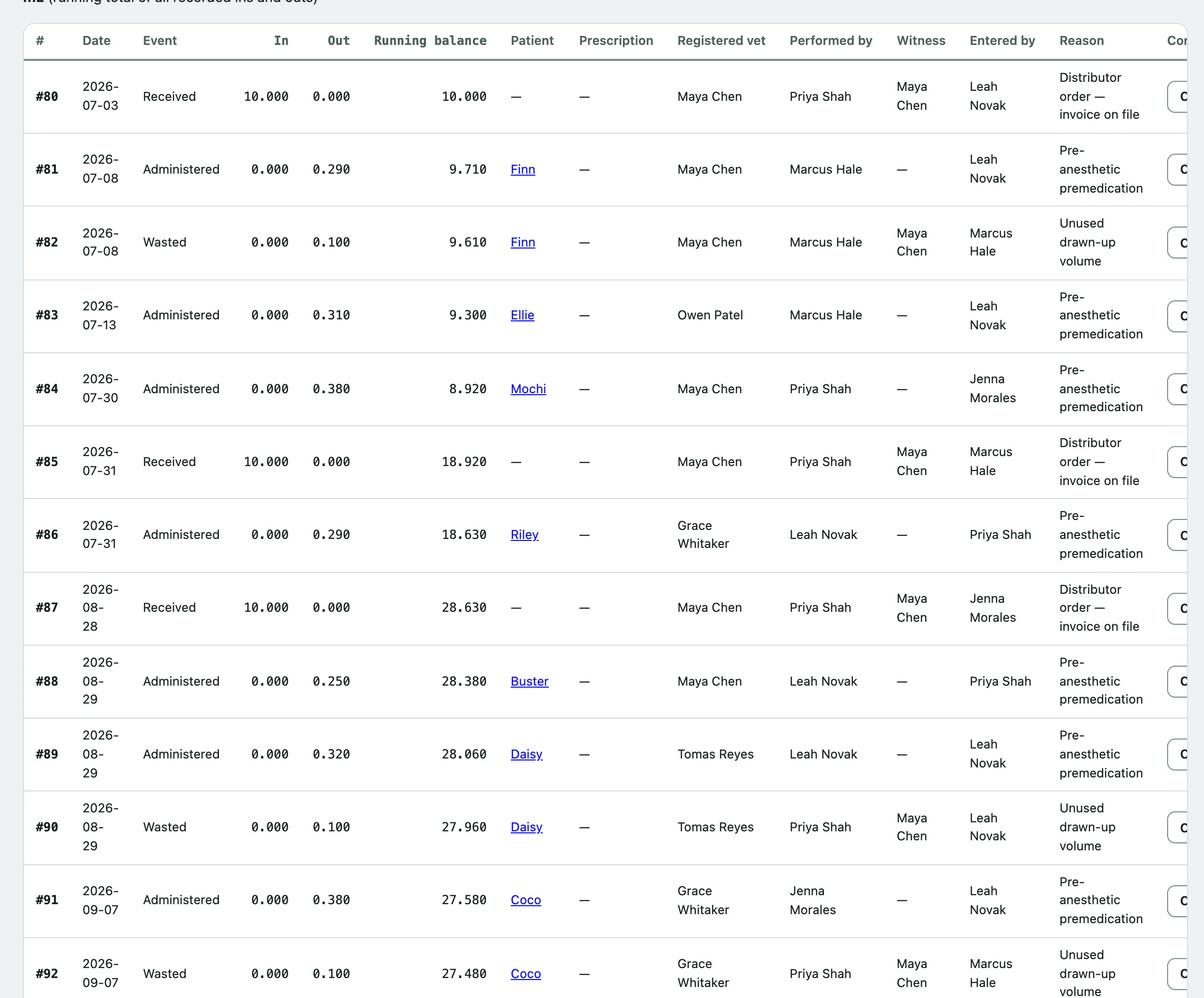
- Under Running log, choose the drug in View item.
You'll see its Current computed balance:, the running total of every in and out, followed by each entry.
Correct a mistake
Select Correct this entry on the wrong row. The form shows the original entry, which stays exactly as it is. Enter the offsetting amounts and say what was wrong, then:
- Select Record correction.
A new entry is added that points back to the one it corrects.
Theft or loss
Under a theft/loss entry you'll find Theft/loss notifications for entry. Each time you notify an authority, fill in Authority notified, Notified on and the filing reference, and select Record notification. Until then it says No authority has been recorded as notified yet.