
Hospital
Record a death in hospital
On this page
When a patient dies during a hospital stay, the death record captures what happened: when, how, whether CPR was attempted, how the owner was told and what happens to the remains. You fill it in as the facts come in, then finalize it once it's complete.
Only staff with admitting authority can create or change a death record. Veterinarians and practice managers can.
Open the death record
Usually you arrive here from the End Stay screen: selecting Mark deceased & open death record creates the record and opens it (see End a hospital stay › End the stay). For a stay that's already marked deceased, select Death & disposition record → on its End Stay screen.
A death record can only be recorded for a stay that's still admitted, or one already marked deceased. A patient who left the hospital alive didn't die in that stay.
Fill in the record
The form is grouped into sections. Fill in what you know now and leave the rest; you can come back to it.
| Section | Fields |
|---|---|
| The death | Date/time of death (required), Pronounced by, Manner of death |
| Euthanasia (only when the manner is euthanasia) | Reason, Consent signature on file |
| Resuscitation | Code status in force, CPR was attempted, CPR duration (minutes), The owner was present |
| Circumstances | What happened, what was attempted, and the patient's condition at the end |
| Owner notification | Notified at, Notified by, Notification method |
| Remains | Disposition, Disposition notes, A necropsy was requested |
- Check the Date/time of death.
- Choose the Manner of death, or leave it — Not yet classified — until you know.
- Choose the remains Disposition. It stays Pending until the owner decides.
- Select Save changes.
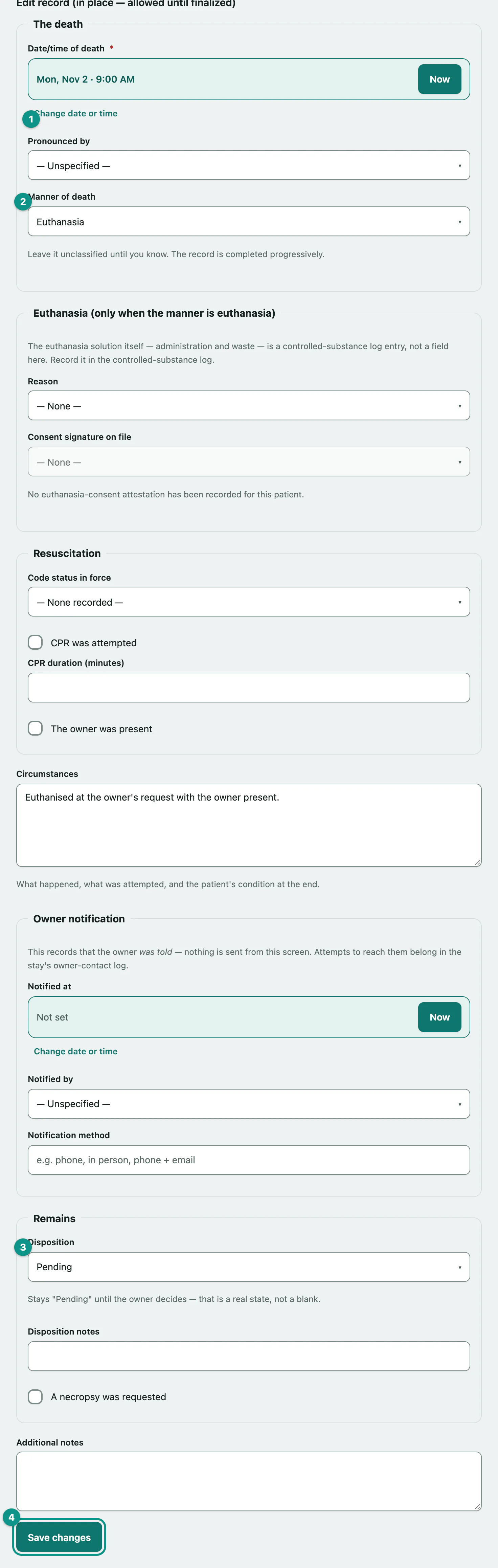
Code status in force is pre-selected with the directive that was in force. Confirm it's the one that actually applied. Owner notification only records that the owner was told; nothing is sent from this screen.
Recording a death from a stay that's still admitted
If you open the death record for a stay that's still admitted, you'll see Record a death. Fill in the same fields and select Create death record. This also ends the stay as deceased, closes its active treatment orders and pending doses, and marks the patient deceased on their record.
Finalize the record
Finalize once the narrative is complete. There's no checklist: a field left blank because the answer is genuinely unknown is fine.
- Under Finalize, select Finalize and lock record and confirm.
Correct a finalized record
- Under Append an addendum, type the correction in Addendum.
- Select Append addendum.
Addenda are listed under Addenda with when they were added and by whom. The original record stays as it was.
Print the record
- Select Print this record. The editing controls are left off the printout.